

Par Jordan ASSOULINE TheExpert DevOps et Technical Evangelist SQUAD
Définitions
Si on en croit la définition "officielle" (https://fr.wikipedia.org/wiki/Virtualisation), la Virtualisation consiste "à exécuter sur une machine hôte, dans un environnement isolé, des systèmes d'exploitation — on parle alors de virtualisation système — ou des applications — on parle alors de virtualisation applicative."
C'est donc un mécanisme informatique consistant à faire fonctionner plusieurs systèmes, serveurs ou applications sur un même serveur physique. Pour résumer, il s’agit de la mécanique visant à partager les ressources techniques d’un serveur physique.
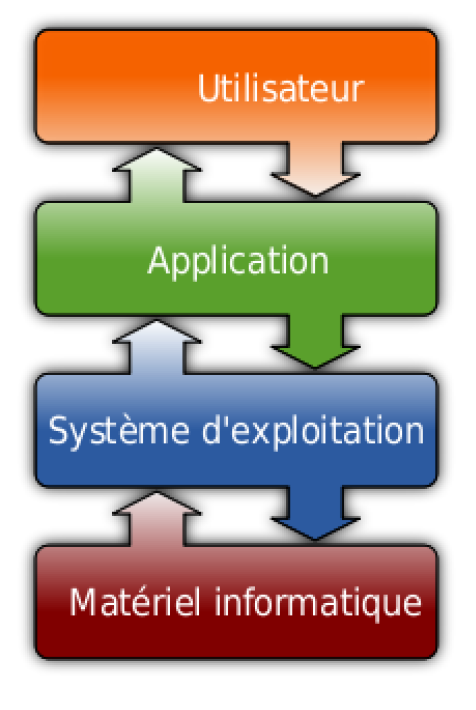
Pour mieux comprendre la virtualisation, il convient aussi de redéfinir (si besoin) ce qu’est un système d’exploitation. Un système d’exploitation, ou « OS » est un logiciel qui pilote les dispositifs matériels et reçoit des instructions de la part de l’utilisateur lui-même … ou d’autres logiciels et applications. L’OS est l’interface entre le matériel informatique (carte réseau, système de stockage, carte son, ports USB, …) et l’utilisateur. Pour faciliter cette interface, le plus souvent, des applications permettent de jouer l’intermédiaire entre l’utilisateur et le système d’exploitation
Comment est née la Virtualisation de serveur ?
... Car « oui ! » quand on dit « virtu » on parle bien de « virtualisation » et, en substance, c’est de « virtualisation de serveur » dont il s’agit.
Replaçons nous quelque temps en arrière. Dans les années 70, chaque service est hébergé sur un serveur différent. Il n’utilise ainsi qu’une fraction (non rentable) du processeur ou de la RAM de la machine dont il dépend.
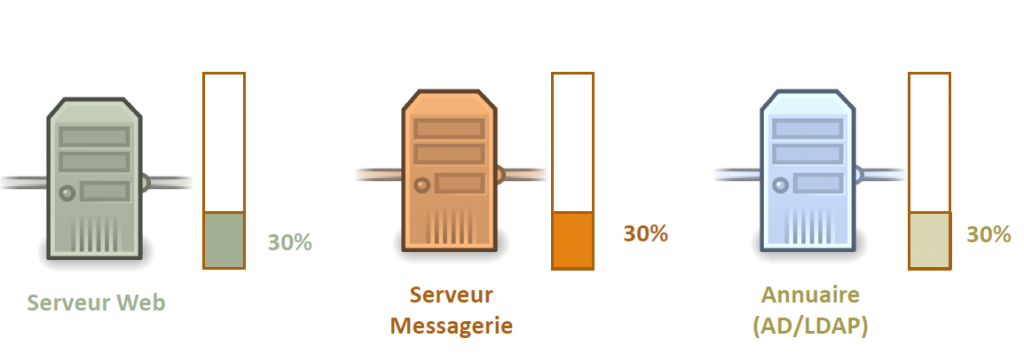
L’idée maîtresse derrière la virtualisation est de répartir l’utilisation du CPU et de la RAM d’une machine physique auprès de plusieurs services isolés au sein de machines virtuelles hébergées sur le même serveur physique. Il convient de préciser qu’on ne charge jamais une machine à 100% pour éviter toute panne.
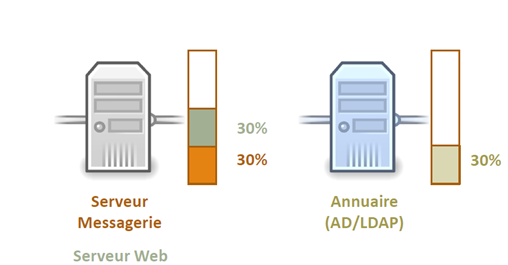
Cette pratique impose un nouveau genre d’approche du travail des machines. Elles ne sont plus dédiées chacune à une opération unique mais intègrent plusieurs fonctions et services. Il faut donc un système pour gérer les différentes machines virtuelles qui peuvent être hébergées sur un seul et même système physique.
On le nomme l’hyperviseur… et deux concepts de Virtualisation émergent alors, catégorisant les hyperviseurs en type 1 ou type 2.
La virtualisation avec hyperviseur de type 1
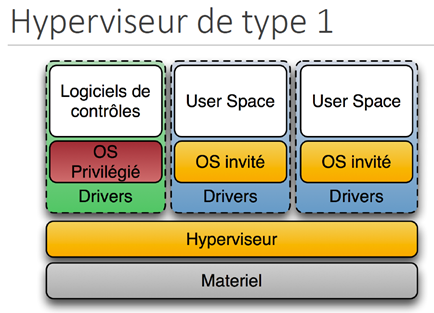
Il s’agit là d’un système d’exploitation dédié, installé en dur sur le système et prévu pour effectuer spécifiquement des tâches de virtualisation. Il fait office de système d’exploitation de la machine. Pour parvenir à orchestrer ses rôles, il va créer des partitions (ou sous-systèmes) miniatures (notamment pour Hyper-V). Chacun de ces systèmes utilisera le matériel de la machine physique via l’hyperviseur qui gèrent le dispach entre les ressources matérielles et les besoins des VMs (Virtual Machine).
Les 4 solutions les plus connues d’hyperviseurs de type 1 sont :
- VMWARE ESXI ou Microsoft Hyper-V côté licence,
- et Xen (sur le déclin) ou Proxmox en open source. A noter : Proxmox permet aussi la gestion de conteneurs.
La virtualisation avec hyperviseur de type 2
Les hyperviseurs de type 2 ne sont pas des systèmes d’exploitation mais des logiciels, plus précisément des émulateurs. Ces logiciels additionnels à un OS arrivent au 3ème niveau, après le matériel et l’OS.
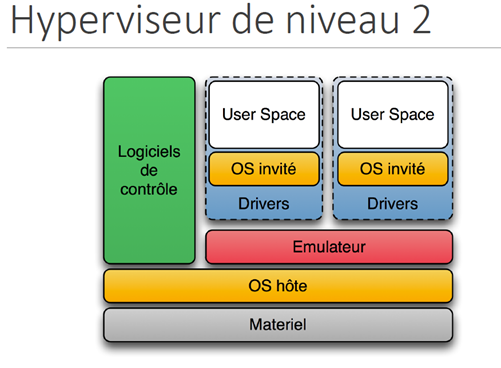
Les hyperviseurs de type 2 génèrent des systèmes d’exploitation virtualisés qui se comportent comme un OS.
Les principaux acteurs de ce type sont VMWARE Workstation côté licence ; QEMU et VirtualBox côté opensource.
Il faut noter que les émulateurs de ce type intègrent généralement d’autres fonctions et utilisations.
En conclusion, la virtualisation se résume à des méthodes et outils pour optimiser l’utilisation matérielle de serveurs. On ne parle nullement de Cloud à ce stade, même si l’abus de langage est fréquent en la matière.
