

Written by Thibault J. - TheExpert DevOps
SonarQube, an open-source tool licensed under GNU GPLv3, opens the door to numerous possibilities for modifications, creating your own plugins, and much more.
A tool that inspects your code for anomalies and vulnerabilities.
It allows you to identify code duplication, measure documentation levels, and detect potential bugs.
This tool can also be used to perform unit tests to assess code coverage. It analyzes code designs and architecture in greater depth and complexity.
Sonarqube continuously inspects code in all project branches.
It shows the health of an application and highlights issues related to the introduction of new features.
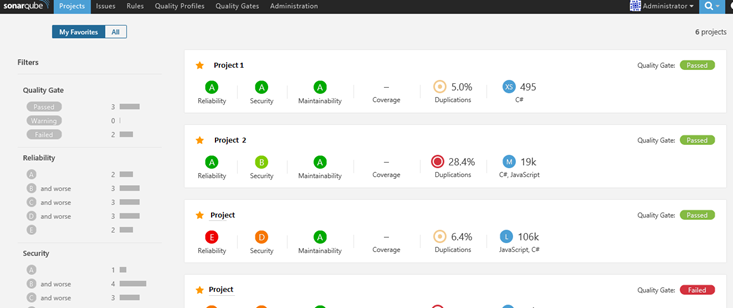
Sonarqube's intuitive and comprehensive web interface.
Sonarqube has a web interface that allows you to view the results of audited and analyzed projects. The interface is very comprehensive and intuitive. Sonarqube evaluates the code of different projects to provide detailed and accurate results.
The tool assigns scores for each criterion: you can customize the quality criteria as soon as you start the audit.
This tool can therefore be adapted to the needs of any organization in any software production context.
Deploy Sonarqube in a Docker container
Sonarqube is easy to set up in a Docker environment with a docker-compose.yml file, as it consists of several services that enable it to function properly:
- A Postgres, MySQL, or Oracle database, which will enable audits to be recorded.
- A Sonarqube server that consists of several services, including a web server and an ElasticSearch module to manage searches on the web interface.
- A server called Scanner, which, as its name suggests, retrieves the project's source code and audits it, then displays the report on the web interface.
We instantiate the sonarqube-server service and open port 9000 outside the container -> the port on which the SonarQube web interface is located.
In the environment section, we declare several variables that will allow us to connect the Sonarqube server to the database, in this case Postgres.
Finally, the volumes that will enable the storage of configurations and extensions.
services:
  sonarqube-server:
    image: sonarqube
    expose:
      - 9000
    ports:
      - "127.0.0.1:9000:9000"
    networks:
      - sonarnet
    environment:
      - SONARQUBE_JDBC_URL=jdbc:postgresql://db:5432/sonar
      - SONARQUBE_JDBC_USERNAME=sonar
      - SONARQUBE_JDBC_PASSWORD=sonar
    volumes:
      - sonarqube_conf:/opt/sonarqube/conf
      - sonarqube_data:/opt/sonarqube/data
      - sonarqube_extensions:/opt/sonarqube/extensions
      - sonarqube_bundled-plugins:/opt/sonarqube/lib/bundled-plugins
Deploying Sonarqube and its database is a breeze with a simple docker-compose file to deploy the various services.
The advantage of using Docker containers is that you can (re)deploy the entire system, thanks to the previously created docker-compose , in case the configurations are incorrect or poorly initialized.
Sonarqube as a whole
Once the Sonarqube tool has been deployed in its entirety, it will consist of the sonarqube-server and its database, and you will retrieve the scanner available on Sonarqube's GitHub.
The docker-compose file, consisting of the two services described above, will run Sonarqube, with the exception of the Sonar scanner, which must be downloaded online and launched separately.
version: "3"

services:
  sonarqube-server:
    image: sonarqube
    expose:
      - 9000
    ports:
      - "127.0.0.1:9000:9000"
    networks:
      - sonarnet
    environment:
      - SONARQUBE_JDBC_URL=jdbc:postgresql://db:5432/sonar
      - SONARQUBE_JDBC_USERNAME=sonar
      - SONARQUBE_JDBC_PASSWORD=sonar
    volumes:
      - sonarqube_conf:/opt/sonarqube/conf
      - sonarqube_data:/opt/sonarqube/data
      - sonarqube_extensions:/opt/sonarqube/extensions
      - sonarqube_bundled-plugins:/opt/sonarqube/lib/bundled-plugins

  db:
image: postgres
networks:
- sonarnet
environment:
- POSTGRES_USER=sonar
- POSTGRES_PASSWORD=sonar
volumes:
- postgresql:/var/lib/postgresql
      - postgresql_data:/var/lib/postgresql/data

networks:
  sonarnet:

volumes:
  sonarqube_conf:
  sonarqube_data:
  sonarqube_extensions:
  sonarqube_bundled-plugins:
An open-source code quality solution that is easy to deploy thanks to Docker
In conclusion, SonarQube is a solution that can be deployed and configured very easily.
Thanks to this ease of use, it is very simple to modify SonarQube's configuration and thus adapt it to the environment in which the tool is deployed.
This also allows you to modify on the fly how SonarQube analyzes your project.
Read more ⤵
