

By Naoufal E., Squad Experts
“Tricks to save you time when coding and deploying your Terraform configuration file easily”
As a Software Architect or a FullStack Developer (someone with a developer background), I always had this fear of the syntax of Terraform configurations (HashiCorp Configuration Language: HCL).
Every time I read an example of a file with this syntax, I couldn't understand anything and I didn't know why.
However, I figured out why: "it was because my brain was formatted or programmed about how to design software, how to make an algorithm to solve a problem, etc. ... And nothing else,"so I tried to understand the Terraform config file with this mindset and I complicated my understanding of a simple configuration language (HCL),
I wrote this story to share with you tips and tricks for a better understanding and deployment of Terraform by implementing the S3M Pattern that I wrote about previously.
To better understand the implemented example, please refer to my previous story.
Prerequisite:
→ AWS Account
→AWS Programatically Accountwith Programmatic Access and Admin Permission
→AWS CLI configured on your laptop(if you want to run your infrastructure from your laptop (~/.aws/config)
→ A better understanding of the S3M Pattern
Terraforming: What? Why? How?
What Is Terraform?
Is an IaC Software Tool 😲 →Infra as Code Software Tool 😳→ A software that allows us to code our Infrastructure 😜.
Coding infrastructure can be done using two methods: Imperative (How) or Declarative (What) or both together.
Imperative:
- Focuses on how the infrastructure must be done
- Defines specific commands that need to be executed in the appropriate order to end with the desired conclusion
Declarative :
- Focus on What the eventual target configuration should be
- Defines the Desired State and the system executes what needs to happen to achieve that Desired State
And Terraform is declarative, so now you know why as a software architect, I complicated things—my mind was always focusing on how (always designing how)—but if you need to understand Terraform easily, you should switch your mind to what, and everything will become too easy 😉
Why should we use it?
Terraform is a great tool when it comes to DevOps and portability. Here are some reasons to consider Terraform as one of your IaC tools:
- Portability: This is the big problem that Terraform solves: it makes it easy to duplicate infrastructure in different environments (DEV, PRE, PROD) at the same cloud provider. Also, because Terraform is completely platform-agnostic, it facilitates the coding resources of the new cloud provider if the company decides to change its cloud provider.
- Terraform allows you to define infrastructure in a configuration file and enables you to easily track changes to infrastructure by keeping your code in source control (Git), building it, and deploying it.
- Terraform has a lively community and is open source, there is a massive community developing around this tool. Many people are already using it, and it’s easier to find people who know how to use it, plugins, extensions, professional support, etc. This also means Terraform is evolving at a much faster rate. They release updates very often.
- Terraform's speed and operations are exceptional. One cool thing about Terraform is that its plan command lets you see what changes you're about to apply before you apply them.
How to Use it?
- Download the latest version and install it
- Select a folder and create a file with the .tf extension, then write this simple example:
# Declare the provider you want to use
provider "aws" {
  region = "us-east-2"
}
# Declare a VPC
resource "aws_vpc" "s3m-vpc" {
    cidr_block = "10.0.0.0/16"
    enable_dns_hostnames = true
    tags = {
    "project" = "S3M"
    "tuto"="medium"
  }
}
In the same folder, open a terminal and run these commands
terraform initThis command is to download all dependencies for your cloud provider (like npm install or dotnet restore for developers lol).
terraform plan This command is for creating an execution plan. Terraform performs a refresh, unless explicitly disabled, and then determines what actions are necessary to achieve the desired state specified in the configuration files.
You can skip this command and apply your IaC directly, but it is recommended to review your plan and fix any errors or bugs before applying your infrastructure.
terraform apply
The
terraform applycommand is used to apply the changes required to reach the desired state of the configuration, or the pre-determined set of actions generated by aterraform planexecution plan.
- You can now go to your account and verify if the VPC has been created in theus-east-2 region.
- And finally, to destroy what you have created, you can run this command:
terraform destroyTips for implementing Terraform on complex architectures
In this section, I’ll give you sometips and tricksto save your time when coding the infrastructure of acomplex architecture.
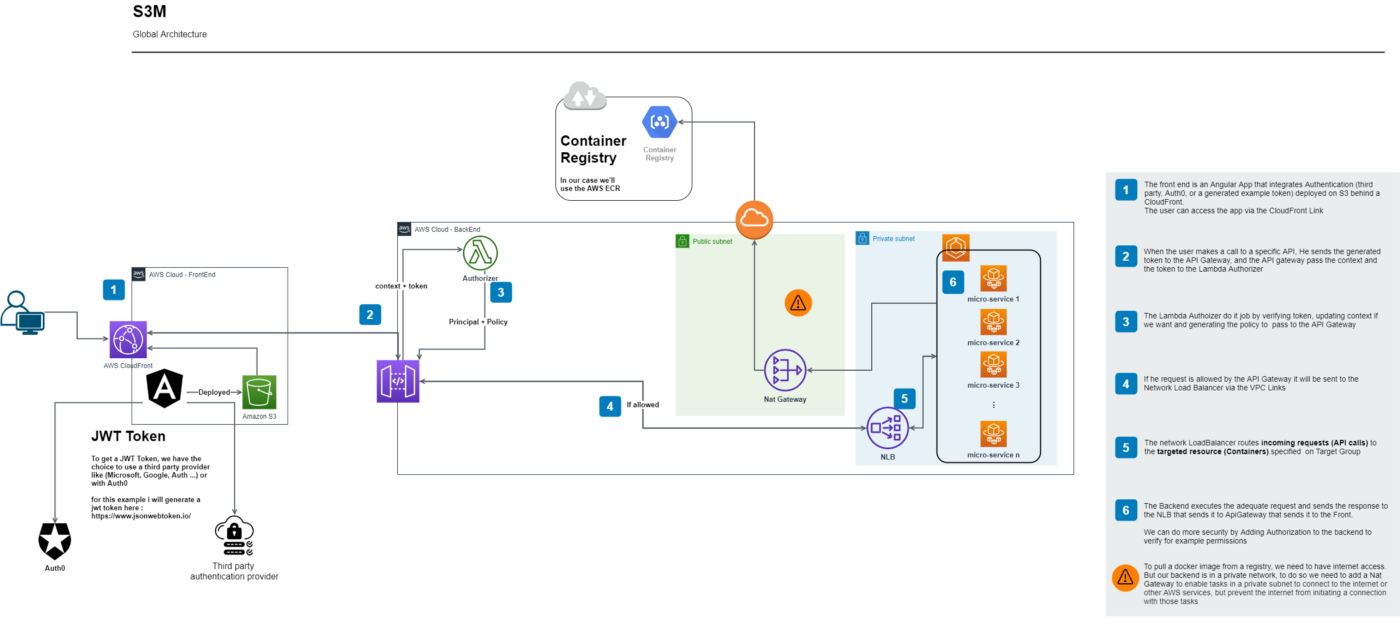
As an example, we will take the S3M Pattern that I wrote before. As a reminder, this is the architecture:
Tip 1: To-Do List of What we want😜:
As you can see, for thispattern weneed theseblocks:
- VPC withthreesubnets (twoprivate andonepublic)
- APIGatewaywith VPCLink
- Authorizer (Lambda andAPI Gateway)
- ECS Cluster FargatwithTaskDefinition andService
- NLB (Network Load Balancer with aTargetGroup)
- S3 forStatic Website Hosting
Tip 2: Create a *.tf file for each block😄:
- mail order
- api-gateway.tf
- authorizer.tf
- cluster.tf
- load-balancer.tf
- s3.tf
- To properly organize our code, we can also create a folder for different policies (JSON files).
Tip 3: The Magic of Copy-Paste 😅
- Open the Terraform Documentation for AWS
- For each file:copy and pastethe configuration and adapt it as shown in the image below:
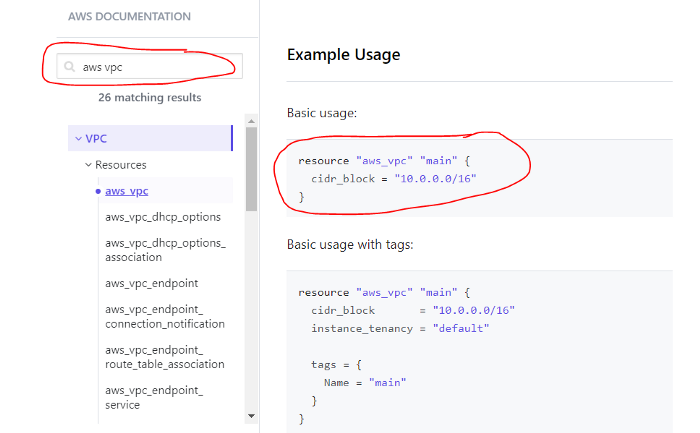
So, for example, thevpc.tf filewill look like this if we implement it with theS3M Pattern:
# Declare a VPC
resource "aws_vpc" "s3m-vpc" {
    cidr_block = "10.0.0.0/16"
    enable_dns_hostnames = true
    tags = {
    "project" = "S3M"
    "tuto"="medium"
  }
}

# Declare all availability zones.
# Declare 1st Availability Zone
resource "aws_subnet" "s3m-public" {
    vpc_id = aws_vpc.s3m-vpc.id
    cidr_block = "10.0.1.0/24"
    availability_zone = var.availability_zone_1
    tags = {
    "name"="s3m-public"
    "project" = "S3M"
    "tuto"="medium"
  }
}
# Declare 2nd Availability Zone
resource "aws_subnet" "s3m-private-1" {
    vpc_id = aws_vpc.s3m-vpc.id
    cidr_block = "10.0.2.0/24"
availability_zone = var.availability_zone_2
tags = {
"name"="s3m-private"
"project" = "S3M"
"tuto"="medium"
}
}
# Declare 3rd Availability Zone
resource "aws_subnet" "s3m-private-2" {
    vpc_id = aws_vpc.s3m-vpc.id
    cidr_block = "10.0.3.0/24"
    availability_zone = var.availability_zone_3
    tags = {
    "name"="s3m-private"
    "project" = "S3M"
    "tuto"="medium"
  }
}

# Declare the Internet Gateway
resource "aws_internet_gateway" "s3m-igw" {
    vpc_id = aws_vpc.s3m-vpc.id
}

# Declare the elastic IP for the nat Gateway
resource "aws_eip" "s3m-eip_nat_gateway" {
  vpc = true
}

# Declare the Nat Gateway
resource "aws_nat_gateway" "s3m-ngw" {
  allocation_id = aws_eip.s3m-eip_nat_gateway.id
  subnet_id     = aws_subnet.s3m-public.id
  tags = {
    "project" = "S3M"
    "tuto"="medium"
  }
}

# Update the defaultroute table
resource "aws_default_route_table" "s3m-rt-public" {
default_route_table_id = aws_vpc.s3m-vpc.default_route_table_id
route {
        cidr_block = "0.0.0.0/0"
        gateway_id = aws_internet_gateway.s3m-igw.id
}
}

# Declare a private route table for private networks
resource "aws_route_table" "s3m-rt-private" {
    vpc_id = aws_vpc.s3m-vpc.id
    route {
    cidr_block = "0.0.0.0/0"
    nat_gateway_id = aws_nat_gateway.s3m-ngw.id
}
}

# Declare the association between private subnets and private route table
# First Private Subnet
resource "aws_route_table_association" "s3m-rta-private-1" {
    subnet_id = aws_subnet.s3m-private-1.id
    route_table_id = aws_route_table.s3m-rt-private.id
}


# Second Private Subnet
resource "aws_route_table_association" "s3m-rta-private-2" {
    subnet_id = aws_subnet.s3m-private-2.id
    route_table_id = aws_route_table.s3m-rt-private.id
}
If you are asking: what about the fulfillment order?!Should we start with VPC, ECS, APIGateway or...?
Answer: It's not your problem 😝, you don't need to worry about this😃, your job is to describe, and Terraform's job is to define the best way to execute your staff's tasks 😉
DevOps Philosophy
Definition
What is DevOps really?DevOps is not a job title,in fact, it is a set of practices that combines software development (Dev) and IT operations (Ops).
DevOps initiatives can create cultural changes in companies by:
- Transforming the way operations, developers, and testers collaborate during the development anddelivery processes.
- Getting these groups to work cohesively is a critical challenge in enterprise DevOps adoption.
- DevOps is as much about the culture as it is about the toolchain.
So when some companies are looking for a DevOps engineer within their workflows, it means that they are not ready to change their philosophy and culture, and this may just deepen the disconnect between developers and operational teams.
Toolchains
DevOps tools fit into one or more activities, which support specificDevOps initiatives: Plan, Create, Verify, Package, Release, Configure, Monitor, and Version Control. For more info clickhere
I'll keep it simple in this story by focusing on these tools:Create (Code),Package (Artifact),Release (Deploy),Configure (IaC), Version Control.
Automate everything with GitHub Actions: (Get your Hands Dirty)
Now that you know whatTerraform andDevOpsareabout, let's automatethe packaging,release, andconfigurationofthedelivery process for the backend, frontend, and IaC (config) withGitHub Actions.
GitHub Actionsmakes it easy to automate all our software workflows withCI/CD. We will use it topackage,release, andconfigureour code right fromGitHub.
Prerequisites:
→ GitHub Account: you will need a GitHub account to clone my repo examples in yours to automate and build pipelines
→ Terraform Free Account: Explained in the IAC Repository below
For automation, I create three pipelines, one for each repository:
As you can see, for each Repo I have aYamlfile that exists in/.github/workflows. This file will be interpreted by theAction Workflow of GitHub torun a pipeline that builds and deploys.
All Yaml files are well commented for a better understanding.
- For IaC: The pipeline will simply apply our infrastructure.
- For API: The pipeline willcontainerize ourpackage in aDocker imageand push it toECR Repo.
- For Static Web Site: The pipeline willbuild ourAngular projectanddeploy ittoS3 Static Web Hosting.
IaC Repository:
To automate the deployment of your Terraform IaC code, you should first create a free account with Terraform and follow these steps.
1- Create Your Organization
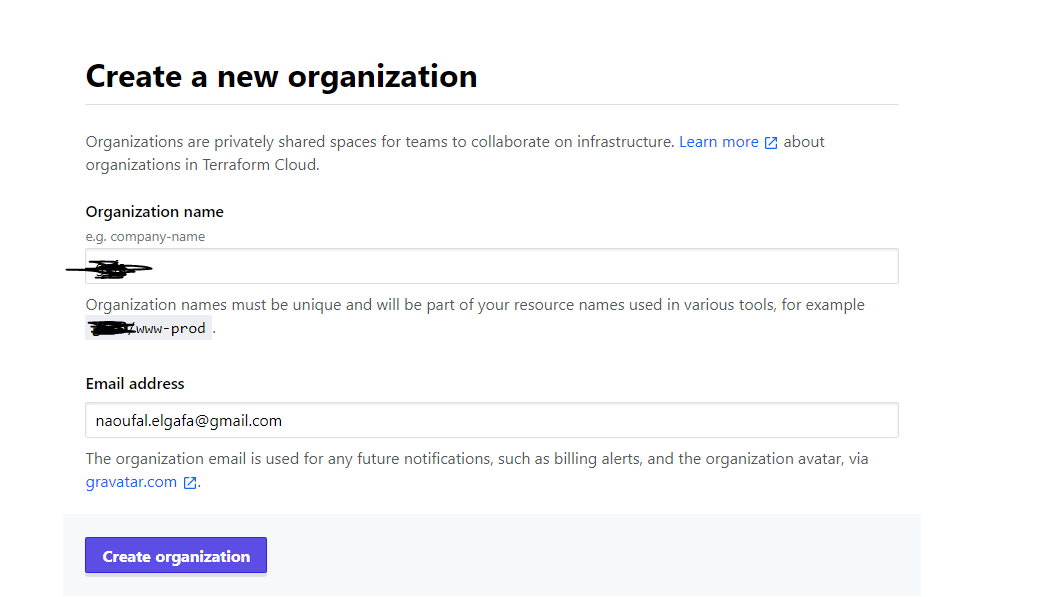
Once the organization has been created, it's time to create the workflow.
2- Create the workflow
To do so, click on API-driven workflow as shown in the image below and create your workflow.
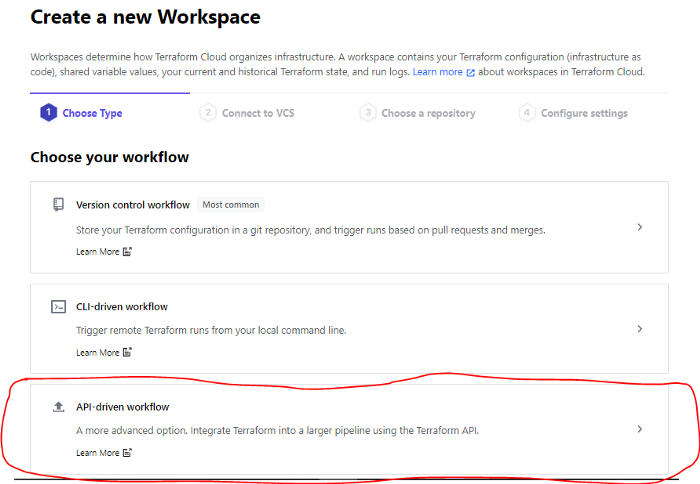
Name your workspace and create it
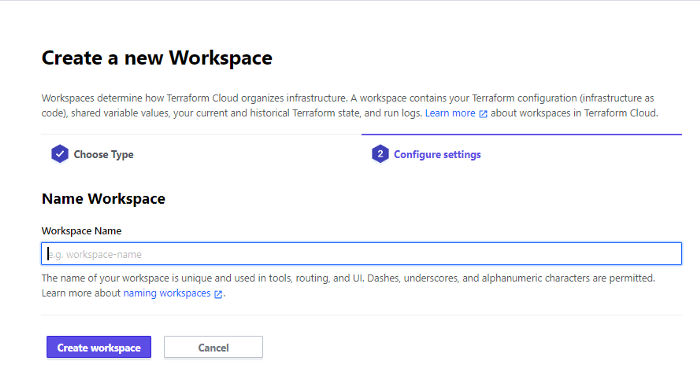
Once the workspace is created, Terraform will generate this code for you to use in your main configuration file (main.tf)that exists in your repository.
So, copy and paste this code (a complete example can be foundin my repository).
terraform {
  backend "remote" {
    organization = "your organization name"
    workspaces {
      name = "your workspace name"
    }
  }
}
3- Generate a Terraform Cloud User API token:
- Go to:https://app.terraform.io/app/settings/tokensand click on“Create an API token”
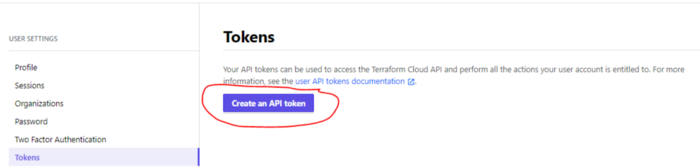
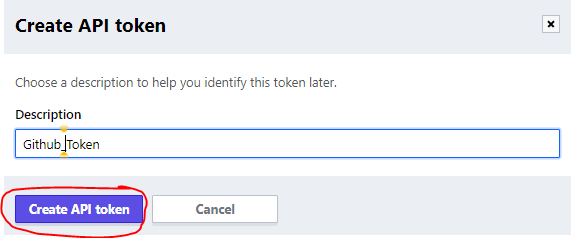
- Give it a description to help you identify this token later and click on"Create API token."
- Copy the generated token
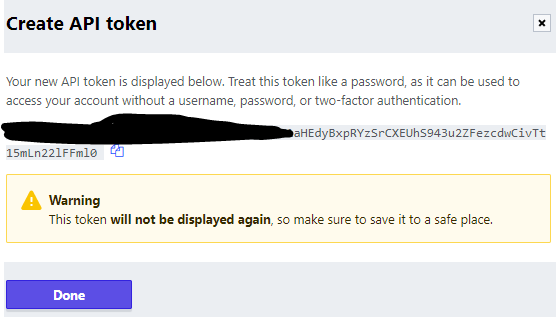
4- Store the generated token as a GitHub secret on the IaC Repository:
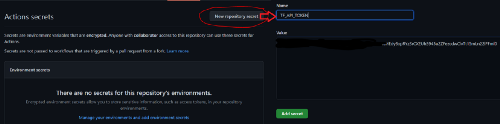
You can follow theGitHub Docs here.
5- Store the AWS Keys on Terraform Cloud Environment Variables:
We need to save ourAWS Access KeyandSecret KeyinTerraform Environment Variable, so when the Github pipeline runs, it will use these credentials toPlan andApply our infrastructureto theAWS Account.
To do so, go tohttps://learn.hashicorp.com/tutorials/terraform/cloud-workspace-configureand follow the steps below.
- Add Environment Variables
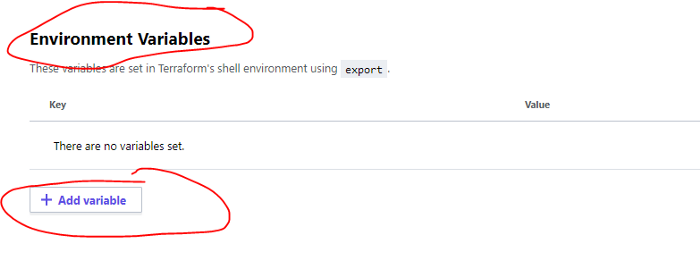
- Create these two environment variables and make themsensitive:
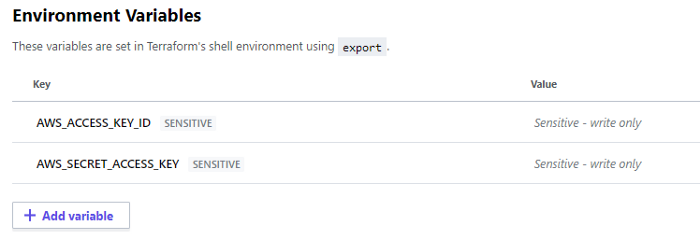
For more information about managing secrets on Terraform, you can follow thisblog.
6- Run your pipeline on GitHub
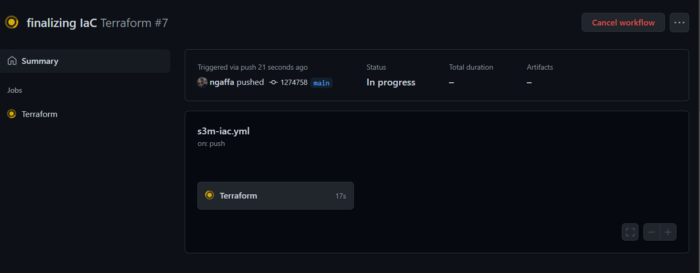
API Repository:
After deploying our infrastructure, it's now time to deploy our API. Otherwise, the pipeline will simply push a Docker image into ECR (that's all 😄).
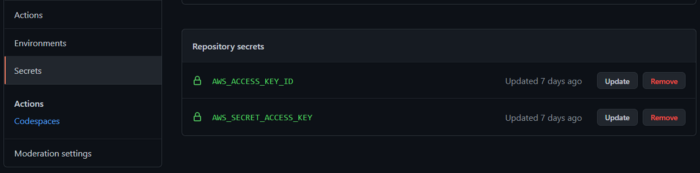
Don't forget to add theAWS_ACCESS_KEY_ID andAWS_SECRET_ACCESS_KEY inthe secret of yourAPI Repository, and run the pipeline via theGitHub Action Tab.
The full example can be found here
Static Web Site Repository:
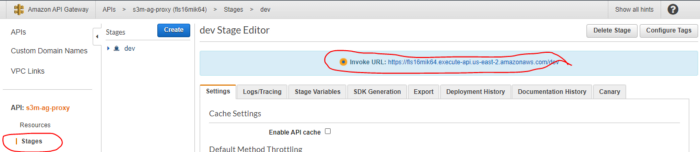
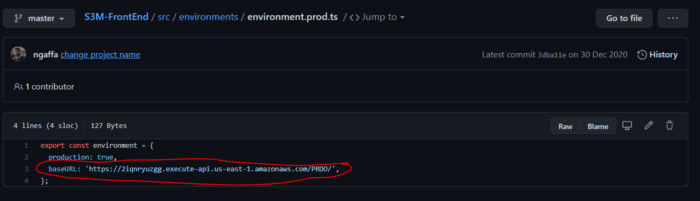
Because we did not attach a custom domain name to ourAPI Gateway, we should copy theEndPoint generatedby our IaC Deployment and paste it into the environment variable of theStatic Web Site.
Another more complicated option is to store the environment variable in a Configuration Manager such as AWS Secrets Manager or use a cloud-agnostic tool such asSOPS.
1- Go to yourAPIGateway Dashboard, click on the createdAPI, go toStages, andcopy theendpoint.
2- Go to yourStatic Website Repository, update the environment file, and make a commit.
3 - Run your Pipeline (Don't forget to add theAWS_ACCESS_KEY_ID and AWS_SECRET_ACCESS_KEY inthe secret of your API Repository, and run the pipeline via the GitHub Action Tab)
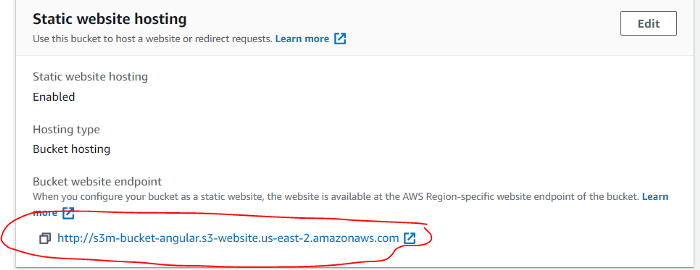
4 - Check if everything works by going to yourS3 static website endpoint, copying the link, pasting it into your browser, and clicking on the"Get weather"button.
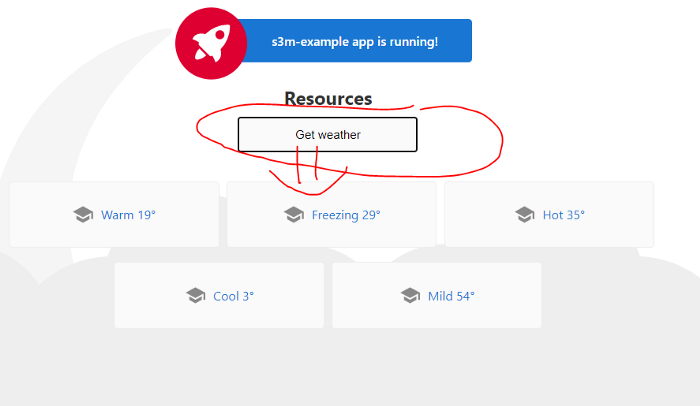
Great, everything was automated and worked like magic.
Conclusion
In real life,coding andmanaging thesource code of theinfrastructure issuch a great thing because it allows theCompany Architect tofollow allchangesets andapply only the changes without destroying the entire infrastructure architecture.
In real life,coding andmanaging theInfra sourcecode is such a great thing as it allows thecompany architect tokeep up with all the changes and apply only thenecessary updates withoutdestroying the entire system.
TheIaC philosophy alsofacilitates theportability oftheinfrastructures:
- Betweendifferent cloud providers
- Between differentenvironments ofthesame cloudprovider
When we tied IaC withreal DevOps philosophy, we save much more time intheprocessdelivery whilemaintainingbettercodequality.
If you are new to these technologies(AWS, IaC, DevOps), this blog will help you understand the sequence of the different building blocks(AWS, IaC,DevOps)and will prevent you from following many tutorials and going in all directions.
I would like to thank Soufian Belehrache for his technical advice.
If you have any comments, or if something isn't clear, please leave a comment or contact me on myFacebook page,Twitter, or viamy website.
Finally, I have a challenge for you:
- Create a GitHub account if you don't already have one.
- Create a Terraform Free Account
- Apply what you have learned in this story “Section Automate everything with GitHub Actions: (Get your Hands Dirty)”
- Good luck
See you at the next Story ✌️.
