Identity management, and in particular access management, has become a major issue in today's digital landscape. Companies are looking for robust solutions that combine security and compliance while simplifying processes.
Among the solutions that have emerged,Ilex's Sign&Go stands out for its innovative user experience. Let's explore how Sign&Go works and compare it with other tools on the market!
What is Sign&Go by Ilex?
Sign&Go by Ilex, since renamed Ilex Access Management Solution, is a French SSO (Single-Sign-On) solution. Initially independent, it has been part of the Inetum group since the end of 2021.
As a reminder, SSO is a mechanism that simplifies user access. Users only need to authenticate once, with the identity federation (IF) tool, Sign&Go in this case, to access all applications configured with the IF without having to log in again.
This multi-module tool meets the various needs of a company in terms of:
- Web SSO
- Enterprise SSO
- mobile SSO
- Identity federation
Thanks to its architecture and centralized auditing and administration functions, this solution is quick to implement and allows users to authenticate themselves in multiple ways on a variety of media:
- Computer
- Portable
- Web application
- Heavy client, Fido2, etc.
OnPremise solution: Sign&Go servers and services are hosted within the IT system of the company using them.
Sign&Go, Ping, and Okta
To better understand Sign&Go's position in the market, we can compare it to other major players in the SSO tools market.
First example: Okta
- Okta is a SaaS solution that needs no introduction. It is quick and easy to learn, enabling you to address a wide range of issues.
- More balanced and effective than Sign&Go, it allows you to manage user access to different applications from any device (mobile, computer, tablet).
- Its use does not require any scripting to function, but still allows for customization. We refer to connectors for each application according to requirements.
The main difference between Okta and Sign&Go is that the latter can be fully customized (via script). This allows it to meet all specific needs in terms of strong authentication, certificate management, and identity federation.
Companies in the banking sector, which have high requirements in terms of access security and regulatory compliance, have this need for customization, for example.
In concrete terms, Sign&Go allows for all types of user use cases, but you still need to have a need for it:
- It is possible to force users to use mobile push to log in to their Windows session or even to maintain strong authentication on a workstation (via fingerprint or mobile push) without them having to enter their passwords.
- To customize a SAMLv2 response from Sign&Go to an application and add claims/information, it may be necessary to use a script when a simple configuration is required on Okta. However, this allows any process/task (directory interaction, other applications or schemas, etc.) to be performed on the data before it is sent.
Second example: Ping
- As an on-premise solution, Ping can be placed on the same level as Okta in terms of functionality and ease of configuration.
- Like Sign&Go, Ping allows you to manage authentication on all types of media. However, it is essential to have Ping's other solution, Ping ID SaaS solution.
The main difference is that you need not one but two Ping solutions to get the same functionality as Sign&Go. It should be noted, however, that Ping offers a wider range of features than Sign&Go, and that these features are much more operational and easier to configure.
Your needs and budget will be decisive factors in choosing the right application for your business!
Authentication scheme: Windows workstation startup
In this example, we have created a schema to manage user authentication. It is a so-called adaptive schema because for each step of our schema, we can define behaviors based on our criteria, depending on whether our criteria are met or not. (Each criterion can be scripted, ranging from filtering IP addresses, webapp agents, or even browser agents.)
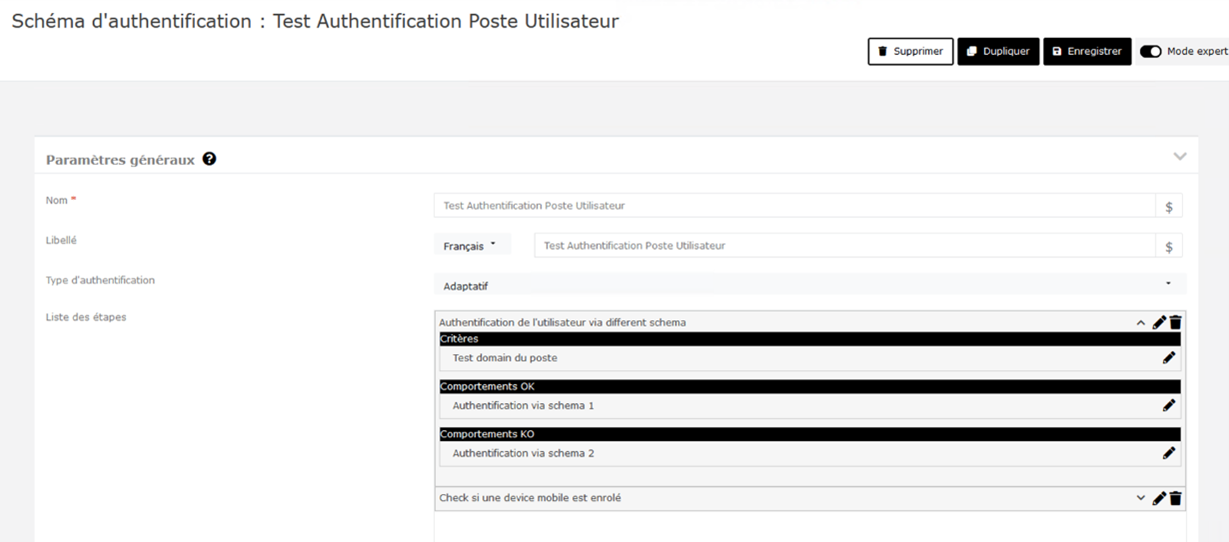
Our first step is to verify the domain that the user is using to log in with their workstation.
- If the domain is the one we defined in our criteria, the user will be redirected to authentication scheme 1 (for example, fingerprint authentication).
- Otherwise, it will be redirected to authentication scheme 2 (for example, authentication via Fido2 key).
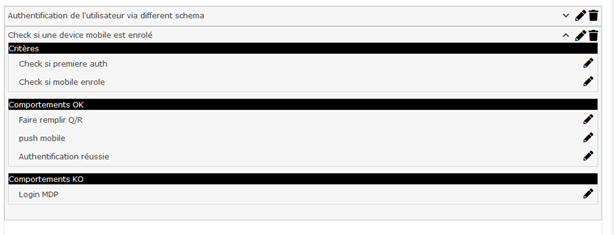
Once this behavior has passed, the next step is to check whether:
- The user has a registered mobile device
- The user has already logged in on this workstation.
If this is the case, we can, for example, have them fill in their questions/answers (used to recover their password if they forget it) and then authenticate them via a mobile push notification (on the Sign&Go authenticator app).
Once the latter has been validated, their session will be opened.
If the user has already logged in to the workstation, we can send them to a login/password screen.
Once this has been entered, their session will be opened.
Each criterion and step in this diagram can be scripted in order to fully customize the diagram and the processes that take place behind user authentication.
Sign&Go: a flexible and highly customizable tool, but complex
The advantages of Sign&Go
Workstation authentication is supported without any additional modules:
- This means that the user who logs into Windows on their computer can be configured and controlled by Sign&Go.
- Depending on the company's needs (strong authentication, simple authentication, mobile push with Sign&Go Authenticator, fingerprint or FIDO2 key with Yubikey)
Sign&Go allows you to manage authentications on all types of media that can be used by a user:
- Using customizable and scriptable diagrams (which are workflows), each user authentication can be different and subject to multiple conditions depending on whether it is a workstation, mobile, web, etc. authentication.
- The conditions supported enable all safety and compliance requirements to be met.
The tool uses its own language, similar to JavaScript, which allows you to script all usable modules:
- SAMLv2, OAuth, OIDC, and even WSFed configurations can be fully scripted for each connection.
- Each diagram can be fully scripted.
Sign&Go, although international, is a French solution that is responsive and constantly evolving: numerous versions and corrective patches are deployed.
Conclusion
In conclusion, Sign&Go is a highly effective access management tool, offering extensive customization and enhanced security.
When considering which tool to use for your project, the choice between Sign&Go, Okta, and Ping should be guided by the specific needs, budget, and environment of the project.
While Sign&Go guarantees enhanced security thanks to its extensive customization options, Okta and Ping offer greater ease of use. Therefore, selecting the most suitable tool will depend on the balance between functionality, security, and ease of implementation required for each use case.
Paul BRESNU
Cybersecurity Consultant