
With the proliferation of applications used by companies, and therefore different user identities, it is now essential to have secure tools for identifying employees and managing their rights.Single sign-on(SSO) mechanisms meet these security needs by centralizing authentication on a specialized service (called an identity provider ).
Centralizing user authentication in one place greatly increases the security of an ecosystem. Thanks to the identity federator, the company will be able to apply security policies (access control, multi-factor authentication, password policy, etc.) while protecting itself to a large extent from phishing attacks.
Enterprise applications that are federated with the identity provider delegate user authentication to the identity provider. In return, the identity provider provides them with the user information that the application needs to create its session.
To ensure that SSO works securely, there are several standard protocols that are supported by most open-source or commercial identity providers. Here is a brief overview of the different protocols that exist.
SAMLv2
SAMLv2 is undoubtedly the most widely used federation protocol to date. It was standardized in 2005 by OASIS. It is based simply on the exchange of XML documents between the application (called the Service Provider in the SAMLv2 protocol) and the identity provider.
How SAMLv2 works
When a federated application in SAMLv2 wants to authenticate a user, it redirects the user to the identity provider by setting a SAML Request parameter. This is an XML document that mainly contains the following information:
- The technical name of the application requesting authentication (called "entity ID")
- The URL to which the user will be redirected once the identity provider has authenticated them (called the "Assertion Consumer Service URL," often abbreviated as ACS)
- Optionally, the request may be signed to prevent it from being modified by a malicious actor between the application and the identity provider.
Once the identity provider has received the request from the application, it will authenticate the user. To do this, it may use several criteria (username/password, Kerberos token, mobile notifications, reuse of an existing session, etc.).
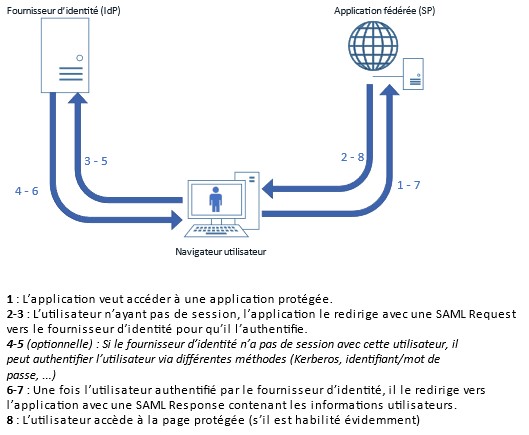
Figure 1: Diagram of exchanges during SAMLv2 authentication
After authenticating the user, the identity provider will redirect the user to the initial application (using the ACS URL that was present in the SAML Request) and attach the user data that the application needs. This data is contained in a new XML document called SAML Response. It contains the following elements:
- The technical name of the identity provider (called "entity ID"). Please note that the application's entity ID should not be confused with the identity provider's entity ID. Both are technical names, but each party to the exchange has its own technical name!
- A primary user identifier (called SAML Subject or NameID)
- Optionally, there may be a list of several secondary user attributes (email address, last name, first name, entity, authorizations, etc.).
- The signature of the SAML response. Please note that the signature is not optional here (unlike the SAML Request), as the security of the SAML protocol is based on this signature.
The application can then create an application session for the user based on the information it has received. The user is authenticated.
SAMLv2 protocol security
It is very important to keep in mind that all SAML exchanges pass through the user's browser. Therefore, there is no flow to open between the application and the identity provider; the only prerequisite is that both are accessible to the user on their browser. The downside is that these exchanges can easily be read or even modified by a browser extension or a malicious JavaScript function.
All SAMLv2 security is therefore based on the SAML Response signature. Applications federated with the identity provider trust it to provide them with information about the user who wants to authenticate. The signature ensures that the response has not been modified before reaching the application.
If user information transmitted by the identity provider is confidential, it is possible to encrypt the SAML response returned by the IdP so that the attributes are not readable. In general, it is advisable to encrypt responses sent to all critical applications.
OAuth 2.0/OpenID Connect
OAuth 2.0, OpenID Connect: what are the differences?
If you have already worked with APIs, you have most likely heard of the OAuth protocol. This protocol was created to enable the management of access authorizations to a resource by a third-party service. It is the protocol used, for example, when you consent to allow your email client (Outlook/Thunderbird) to access your Gmail account online. In this example, once the user has consented to the operation, Google will issue an access token (more commonly known as an Access Token) that is valid within a specific scope. The email client can then use this access token to perform the actions that the user has authorized it to perform within that scope (read emails, send emails, etc.).
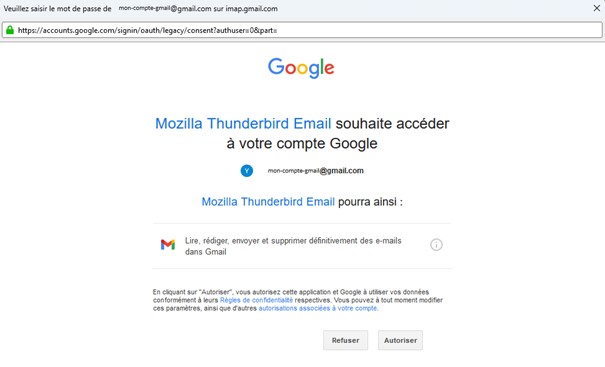
Figure 2 : Example where an email client (here Mozilla Thunderbird) is allowed to access emails from a Google account
OAuth 2.0 was therefore created to enable access to resources between applications. In this process, the user authenticates themselves for the sole purpose of authorizing or denying these actions (sending emails, reading the calendar, etc.) by a third-party application on their resources. OAuth is not intended to authenticate the user so that they can access an application. It cannot therefore be considered an SSO protocol.
To complement OAuth 2.0 and give it the SSO authentication features that businesses want, the OpenID Foundation has introduced a new protocol,OpenID Connect. This is an extension of OAuth 2.0, which adds a new token (in addition to the access token), the identity token (known as the ID Token). This identity token will contain all the user information necessary for an application to function, so the OpenID Connect protocol can be used as an SSO protocol. This protocol is used by online identity providers, such as France Connect, to connect to French government websites and applications, or buttons such as "Sign in with Google" and "Sign in with Facebook."
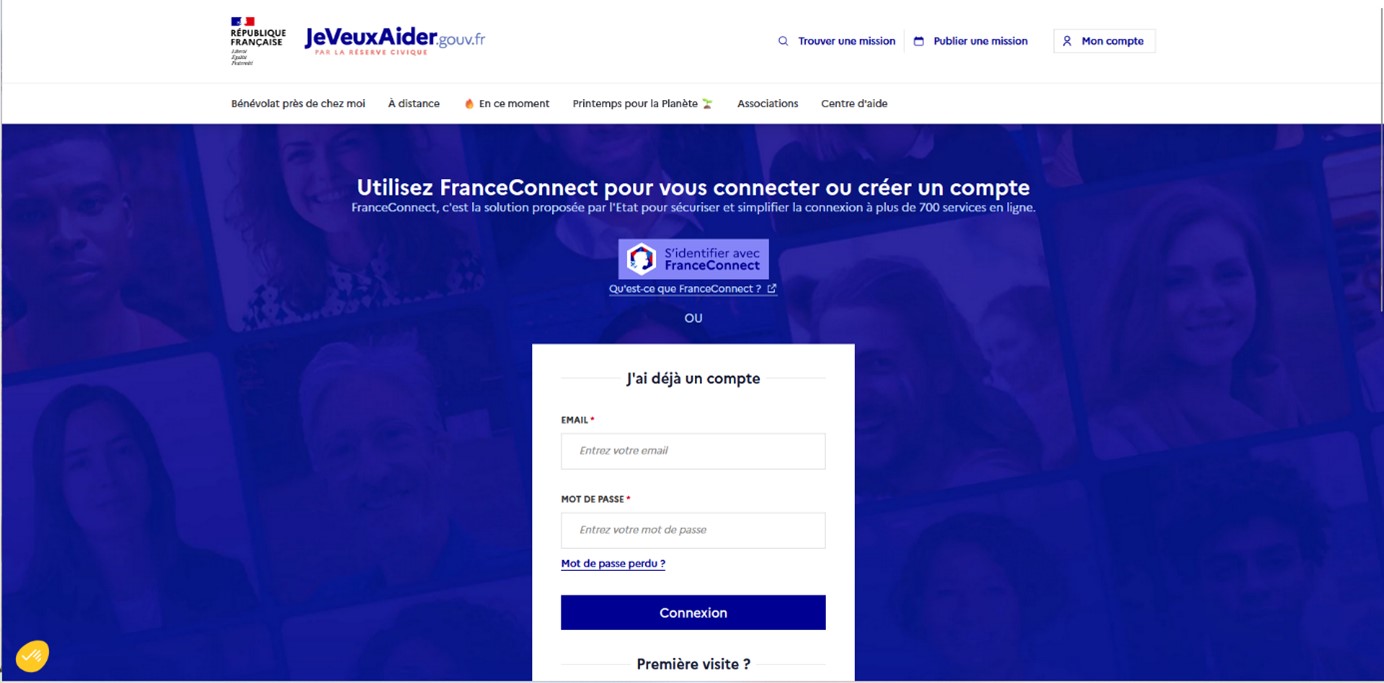
Figure 3 : Example where a user is allowed to log in to a service (here jeveuxaider.gouv.fr) either using federated authentication (FranceConnect) using the OpenID Connect protocol, or local authentication with username + password.
How OpenID Connect works
The OAuth 2.0 standard defines several flows, i.e., different processes for generating an Access Token. Two of these have been adopted by the OpenID Connect protocol:
- Implicit Flow
- Authorization code flow
The Authorization Code Flow
The Authorization Code Flow is the most commonly used flow for user authentication. It consists of two client/server exchanges. It begins when the application requesting authentication (called the "client") redirects the user to the identity provider (called the Authorization Server), with a few simple parameters in the request:
- The client ID (unique application identifier)
- The redirect URL to which the user will be redirected after being authenticated by the Authorization Server
- The flow type (grant_type): here it will be "authorization_code"
- One or more scopes (at least the "openid" scope).
The Authorization Server will then authenticate the user (username/password, Kerberos token, mobile notifications, reuse of an existing session, etc.). Once authenticated, the user is redirected back to the federated application using the redirect URL that was sent as a parameter in the initial request, with a one-time code.
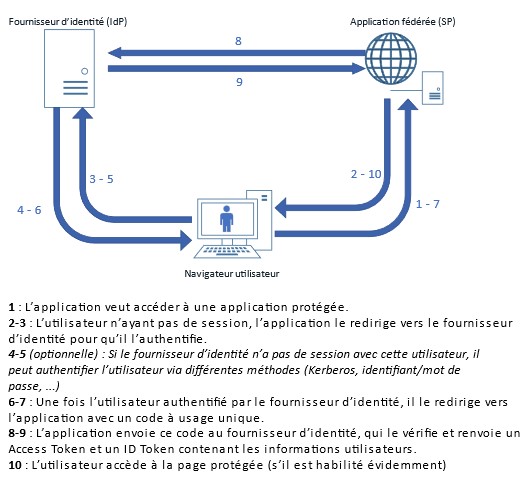
Figure 4: Diagram of exchanges during the Authorization Code Flow (OAuth 2.0/OIDC)
In order to obtain the Access Token and ID Token (in the case of OpenID Connect authentication), the client application must then reconnect to the Authorization Server, making an API call directly to the identity provider, with the following parameter:
- The customer ID
- The secret client (a secret that only the client application and the identity provider should know)
- The code received during the first exchange
- The redirect URL
- The type of flow ("authorization_code")
The Authorization Server will verify that all these parameters are correct and consistent with those used during the first exchange, and will return two tokens in response: an Access Token (which could be used by the client application to access third-party resources) and an ID Token (which can be used to retrieve user information and create a session for the user).
You may be wondering why we perform these two client/server exchanges, in which we first retrieve an intermediate code before retrieving the identity token (which is what we want), when in SAMLv2 there is only one redirection.
The approach of the authorization code flow here is to prevent sensitive data (access tokens allowing access to application resources, ID tokens containing private information) from passing through the user's browser.
The first step in retrieving the code is a redirection (which takes place in the user's browser) and is therefore potentially interceptable. The second step consists of sending the previously received code to obtain the tokens.
However, this step is performed ina"back channel," i.e., directly between the application and the identity provider. They share a common secret (called a "client secret") that prevents an attacker who intercepted the code during the first phase from retrieving the tokens before the client application.
Implicit Flow
Implicit flow is a "shortened" version of the Authorization Code Flow. Instead of two client/server exchanges, it only performs the first one. The identity provider does not send a code that can be used to retrieve the access and identity tokens in a second exchange, but sends these tokens directly.
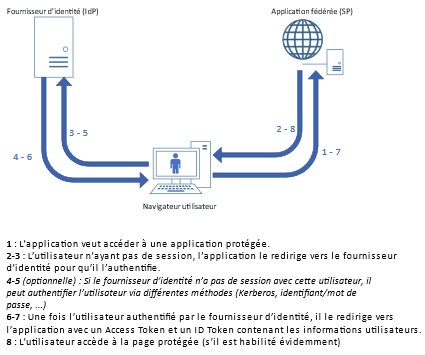
Figure 5 : Diagram of exchanges during implicit flow (OAuth 2.0/OIDC)
Since there are noback-channelconnections, the Implicit Flow is considered much less secure than the Authorization Code Flow (all user data passes through the browser). The Authorization Code Flow should therefore be preferred.
The only case where Implicit Flow is useful is when communication cannot be established between the identity provider and the application (for example, if the identity provider is only accessible via the company's intranet and the application is SaaS). In this case, back-channel communication using the Authorization Code Flow is not possible, so the Implicit Flow must be used.
What is PKCE?
While researching the OAuth/OpenID protocol, you may have heard of PKCE (Proof Key for Code Exchange).
This is an extension of the Authorization Code Flow, which prevents a script that has intercepted the code returned by the Authorization Server from using it to retrieve the user's tokens.
This type of security is essential for applications whose code runs directly on the client's machine (pure JavaScript, React, Angular, or heavy mobile/client applications). For this type of application, the secret key cannot be considered secure.
The PKCE will simply generate a random string of characters, which will be hashed. During the first phase of the Authorization Code Flaw, the application will send the result of the hashing operation (called the "challenge code"). During the second phase, the application will send the original character string (called the "verification code"), which only it should know due to the complexity of performing an inverse operation on a hash. The Authorization Server will be able to easily verify the validity of the challenge code/verification code pair.
PKCE allows the Authorization Server to ensure that the application that initiated the exchange is the one that completes it. This is why PKCE is essential for all applications running directly on the client side, but more generally recommended for all applications using OAuth 2.0 or OpenID Connect protocols.
OAuth 2.0/OpenID Connect Security
OAuth 2.0 and OpenID Connect are based on token exchange (access or identity). These tokens are issued in JWT (JSON Web Token) format. This format consists of three parts:
- The header, which contains the few technical elements used to generate the token
- The body containing useful information about the token (user information or scope accessible by the token).
- The cryptographic signature of the first two parts. This signature, generated by the Authorization Server, must be verified by the application receiving the token. This will allow it to validate its authenticity.
To facilitate the maintenance of cryptographic signature certificates, the OAuth protocol defines an endpoint on which the Authorization Server exposes the public keys of its signature certificates. This means that when certificates are changed, applications can automatically retrieve the new certificates without any changes to the application configuration.
WS-Fed
The WS-Fed protocol (short for "Web Services Federation") is an SSO protocol introduced by a consortium of major IT companies. It is very similar to SAML, but is not as widely used. Nowadays, the only company that still uses it on a large scale is Microsoft, which uses it for the federation of its Office suite, even though Microsoft is increasingly relying on OAuth with Azure AD. That's why, unless you're a Microsoft developer (in which case I'm not sure this article will be very useful to you), this protocol is no longer really recommended. SAML is preferable because it has more support.
Comparison of different protocols
All these different protocols are well and good, but the question you need to ask yourself is: which one is most appropriate for my application? Here, we will try to summarize the advantages and disadvantages of each protocol according to different types of applications.
You do not need to identify the user.
If you simply want to allow a third-party application to access your application's resources, you must use the OAuth 2.0 protocol. This is not an SSO protocol per se, but it is designed for data exchanges between applications. The user can still give their consent to authorize these exchanges.
You are using a SPA architecture
If you want to authenticate a user but are using a Single Page Application architecture, such as JavaScript applications written in React.js, Angular, or Vue.js, this type of application, which runs on the client browser, is much more suited to the OIDC protocol. The vast majority of frameworks for this type of application often support this protocol almost natively. It should be noted that in this case, the Authorization Code flow with the PKCE extension is mandatory.
You are using an MPA architecture.
If you want to authenticate a user and you are using a "MultiPage Application" architecture (with application logic on the server side), you are spoiled for choice. You can easily find libraries that allow you to set up SAMLv2 or OpenID Connect authentication in PHP, Java, Python, JavaScript, etc.
How do you choose the right protocol in this case? Unfortunately, there are no ready-made answers in this case; it will depend on several criteria: which identity provider is used in your company, the rules put in place by the teams managing SSO, etc. The protocols themselves have their advantages and disadvantages.
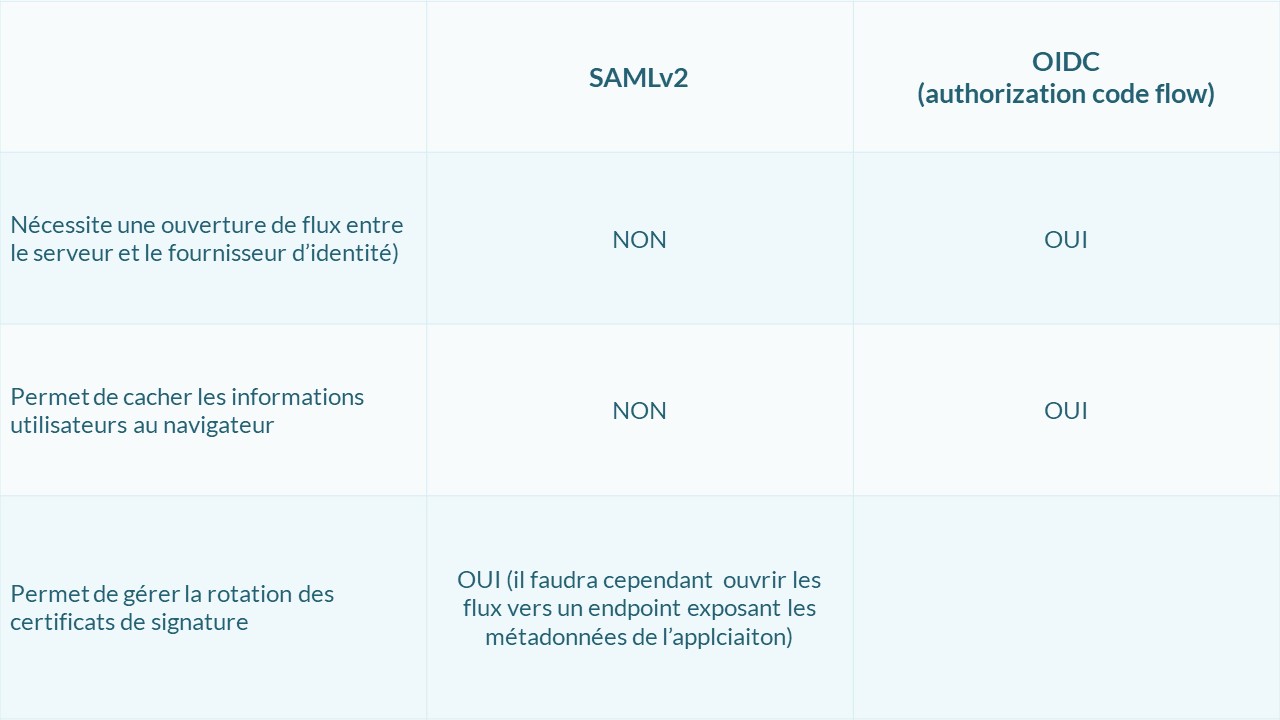
In summary
We have seen that there are three main protocols for single sign-on:
- SAMLv2
- OpenID Connect (not to be confused with OAuth 2.0, which is an authorization protocol and not an authentication protocol)
- WS-Fed
Since WS-Fed is not really used and can be replaced in all cases by SAMLv2, it should be avoided most of the time.
Furthermore, the choice between SAMLv2 may depend on several criteria: application architecture, identity provider, etc. If you are using a recent identity federator, it should support all these protocols. If you would like to learn more about the different identity federators, their advantages and disadvantages, I invite you to read this article comparing the solutions offered by Okta, PingIdentity, and Ilex.
I strongly encourage you to read the online documentation for the identity federator you are using, as it usually contains specific examples of SSO integration. Also, if you would like to see concrete examples of SSO implementation in your programming language or framework, there are hundreds of projects on GitHub that cover these topics.
This article has given you a brief overview of the different protocols, but there are many more subtleties to each of them. As all of these protocols are standard protocols, you can read their public definitions to deepen your knowledge. These are not intended for beginners, but they are very useful once you know what to look for:
Finally, identity federation is a good tool for securing authentication to enterprise applications, but it is useless without security policies (strong authentication, access control, risk assessment, etc.) that allow for a detailed assessment of an application's security needs and user experience. Thus, an application such as a corporate VPN, although it can be federated to the IdP, will require strong authentication (with multi-factor authentication), while other less critical applications (room reservations, team scheduling, etc.) may use transparent authentication (using a Kerberos token).
Yannis DUHAMELLE
Cybersecurity Consultant