

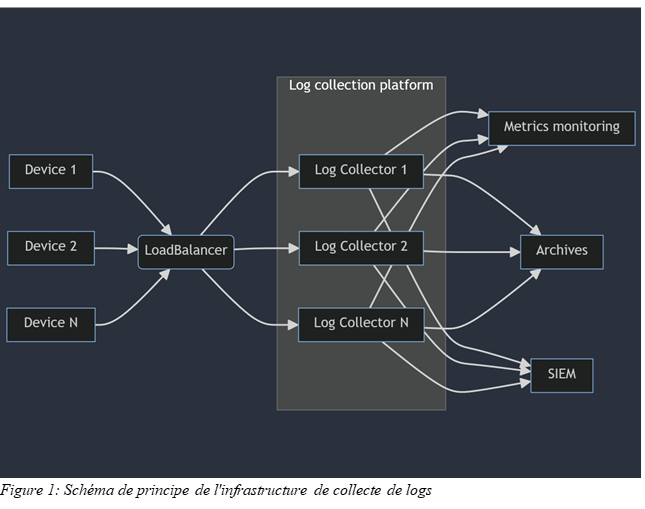
When you want to send logs from various environments to a SIEM, the commonly deployed solution first goes through a centralization platform that serves as a single point of entry for data and dispatches it to the SIEM, a legal log archiving system, various monitoring tools, etc. Configuring this centralization platform can quickly become tedious over time: multiple configurations, lack of tracking of manual changes, complex rollbacks in case of errors, "production testing," etc. These issues are exacerbated if the centralization function is carried out by several servers. We will see that by combining well-known CI/CD tools with the services "offered" within AWS, we can address these issues relatively easily.
This article is a review of what has been achieved within a project and is not intended to show an ideal deployment, but simply to address what can be achieved using an existing system.
Description of the environment
Collection architecture
Log centralization is hosted within AWS on EC2 instances. These EC2 instances are published to the outside world through an AWS LoadBalancer. The LoadBalancer listens on a series of UDP or TCP ports. Any traffic arriving on these ports is redirected to the collection EC2 instances. The LoadBalancer itself monitors the availability of ports on the EC2 instances to determine which instance(s) the flow can be directed to.
Note: LoadBalancer configuration is outside the scope of this article.
The service present on the log collector instances here is FluentD. It is an open-source tool that collects logs via various plugins included natively in the application or developed by the community.
Note: We are talking about FluentD here, but the principles discussed in this article also apply to other more traditional tools such as Rsyslog or syslog-ng.
Versioning, continuous integration, and continuous delivery
For each modification (creation/deletion/update) made to our collection configuration, it is important to be able to answer a few questions:
What change are we talking about?
Who made the change?
When did this change take place?
Why was this change made?
Storing our configuration in a versioning system will allow us to store a history of all changes made to our configuration, as well as the answers to these four questions in the form of metadata. We will combine this versioning system with a Continuous Integration/Continuous Delivery (CI/CD) tool in order to automate certain actions when changes are made to our configuration.
There are a few tools with these features, but we have chosen GitLab, which integrates everything we need and can be deployed at the heart of our infrastructure.
Platform security
The use of a CI/CD tool can lead to numerous security risks due to its purpose of executing a set of commands within the target infrastructure. These include the execution of arbitrary code that could cause service outages within the platform or lead to the publication of confidential information, either intentionally (a malicious actor taking control of the CI/CD system) or unintentionally (an operator error). It is therefore important to be particularly sensitive to this issue and to fine-tune the permissions of the various systems involved as much as possible.
For the rest of the article, the necessary permissions will be detailed at each step.
Branches and pipelines
Using GitLab to store our configuration allows us to define triggers for our CI/CD on specific events. Our requirement will be as follows:
Any configuration changes pushed to the Git repository should not be deployed automatically.
A set of changes must first be validated in an integration environment.
A deployment into production can only be authorized once the changes have been validated in integration.
The following policy will therefore be applied:
The "main" branch of the project is the image of the production configuration and will serve as the basis for deployments. Any live changes to this branch will be prohibited by protecting it.
An "integration" branch will be created and will serve as the basis for configurations to be validated. As with the "main" branch, any live changes to this branch will be prohibited by protecting it.
A branch will be created for each set of changes to be applied to the collection platform (e.g., definition of a new collection scope). Once the changes are considered complete, the branch will be merged into the "integration" branch.
For each merge in the integration branch, the configuration will be deployed to an integration environment by triggering a CI/CD pipeline. If this deployment goes smoothly, the content of the "integration" branch will be "merged" into the "main" branch.
For each merge in the main branch, a configuration deployment will be performed in the production environment by triggering an CI/CD pipeline.
Deployment and configuration management will be entirely handled by a CI/CD pipeline. Deployment in integration or production will be carried out in exactly the same way, with only the targets differing. To do this, we will use the conceptof environments within GitLab, which allows different values to be defined for the same variable. Other features are also provided, such as ensuring that only the most recent deployment job for a given environment is executed, and tracking each deployment.
Configuration deployment
Publication of the configuration
Publishing the configuration itself is relatively simple, involving pushing the configuration files to an S3 bucket. A distinction can be made between production and integration platforms by using different S3 buckets or by using a differentiated tree structure within a single S3 bucket. To ensure that no obsolete configurations are retained, the content already present in the S3 bucket is deleted before the new version is pushed to it.
To enable our CI/CD to publish configuration files to our S3 bucket, we will need to give our GitLab runner the right to list, push, and delete objects in S3 storage. We will therefore need to authorize the following actions:
s3:PutObject
s3:GetObject
s3:DeleteObject
These actions should ideally be authorized on the configuration objects that we are going to push. Here, this will involve
arn:aws:s3:::log-collection-bucket/configuration/integration/*
arn:aws:s3:::log-collection-bucket/configuration/production/*
Taking configuration into account on collection instances
The first step is complete: we know how to make the configuration available for deployment on our collection servers. Now we need to apply it to our collection instances. In theory, this will involve downloading the files stored in our S3 bucket, comparing them with the existing ones, and restarting the service if any differences are identified. We can also trigger a notification (using AWS SNS, for example) to notify operators whether or not the collection service has been successfully restarted.
The question now is how to launch these operations. Since our instances are hosted in AWS, we can use the "Run Command" feature of the AWS System Manager service, which allows us to execute a series of commands from our systems. These operations will be launched in parallel, and we will benefit from the audit performed through AWS CloudTrail if necessary.
We are updating our CI/CD configuration accordingly by adding the AWS System Manager "SendCommand" command. In our example, the logic for restarting the collection service is executed by a Python script located directly on our systems at "/opt/log_collection/deploy.py" and taking as its only parameter the address of the S3 bucket containing the configuration to be applied.
From a security standpoint, calling AWS System Manager can be problematic because we are allowing remote commands to be executed on our systems. We must therefore ensure that our CI/CD does not have permissions to execute commands via System Manager except to our log collectors. Assuming we have tagged the instances that make up our collection platform as "InstanceRole: LogCollection," defining a ResourcePolicy as follows, allowing the use of the "ssm:SendCommand" action, will ensure that only CI/CD can launch operations through System Manager to log collection instances.
For more advanced security, everything will depend on the form that the deployment script takes: script interpreted directly on the target systems or use of an SSM Document.
What about secrets?
As we know, storing secrets directly in a Git repository is very bad practice. Unfortunately, our configuration may require the use of secrets: certificates and private keys for setting up TCP connection encryption, credentials for accessing a file storage service, API keys for accessing a web service, etc. It is therefore necessary to ensure that none of this information is stored "hard-coded" in our configuration. To do this, we will use the AWS Secret Manager service, which allows us to store our secrets so that they are available for various uses.
API credentials and keys
Most collection services can access environment variables. We will therefore rely on this feature to transmit our various passwords, passphrases, or API keys to our collection service.
In the case of FluentD, the environment file is available at "/etc/sysconfig/td-agent" and must contain the environment variables that will be loaded when the service starts, in the form "export VAR1="foo"". Our configuration deployment script will therefore be responsible for populating this file with the secrets published in AWS Secret Manager. As with the rest of the configuration, we will generate a temporary environment file that will be compared with the current file. If any differences are identified, the collection service will need to be restarted.
To generate this environment file, we will create a secrets.conf file in our repository. Each line of this file will refer to a secret and will be formatted as follows: "env#var_name#aws_secret_arn."
"env" is a keyword that we will use later to distinguish between environment variables and files in this file.
"var_name" is the name of the environment variable as expected by the collection service.
"aws_secret_arn" is the identifier of the secret stored in AWS Secret Manager.
Certificates and private keys
Depending on the collection methods chosen, it may be necessary to deploy certificates and/or private keys, either to enable the reception of TLS-encrypted streams or to enable authentication to remote services through key exchange. We can store these files in the "/etc/td-agent/certs/" folder.
The logic applied here is equivalent to what we could have implemented for secrets stored in the environment, so we will capitalize on the "secrets.conf" file previously created and add lines to it in the form "file#file_name.pem#aws_secret_arn." The difference is that instead of storing the secrets as environment variables in a single file, we will copy the contents of the AWS secret to a file located in a temporary folder and named according to the instructions contained in the secrets.conf file. Once all the secrets have been transferred to the local server, if there are any differences between the temporary folder and the folder used by the service, the contents of the destination folder will be deleted, all the data from the temporary folder will be copied to it, and the collection service will be restarted.
Security
The files identified above are particularly sensitive due to their content. Access to them must be carefully controlled to ensure that only the collection service has access to them. We will therefore add the appropriate commands to our deployment script to ensure that the owner of the "/etc/sysconfig/td-agent" file and the "etc/td-agent/secrets" folder and its contents is the user with whom our collection service is launched, and to ensure that only the owner of these files is able to read them.
In addition, it will be necessary to grant permissions to the EC2 instances hosting the collection service to read and decrypt secrets in AWS Secret Manager. It will also be necessary to restrict this right to only those secrets necessary for collection, for example by adopting a naming convention for our secrets.
Implementation of tests
We now know how to deploy our configuration and restart log collection if necessary in the event that changes need to be taken into account on our integration platform or production platform. If a configuration is invalid, our integration platform will not be able to restart, which will prevent us from deploying to production and making our collection unavailable. However, it would be best to realize that our configuration is invalid before deploying to integration. To do this, we will implement a logic that allows us to test and validate our configuration each time a change is published in our repository.
We will therefore add a stage to our CI/CD configuration, which we will simply call "Test," as well as a job that will be linked to it and executed systematically. This job will load in an environment where FluentD is pre-installed (using a Docker image is particularly useful here) and will execute the same commands as the deployment script, with one exception. FluentD is able to run a configuration check and stop. If there is a configuration error, the command fails and returns a non-zero return code. We will therefore replace the service restart command in the test script with the configuration validation command.
From now on, if there is a failure during configuration generation (e.g., inability to retrieve a secret) or if the configuration is invalid (undefined environment variable, error in configuration file syntax), the job will fail, stopping any progress in our CI/CD and blocking deployments to integration or production environments. It will also be possible to configure the project in GitLab to block any Merge Request as long as the CI/CD fails, effectively forcing the presence of a syntactically correct configuration in the "integration" and "main" branches (and therefore on our integration and production environments).
It is important to note that the system on which our test script will be run must have the same permissions on AWS Secrets Manager as our integration and production EC2 instances. This is because part of the testing involves retrieving secrets in order to ensure the configuration is correct.
Securing CI/CD
We now know how to deploy our configuration across all our systems while managing the various secrets required for the proper collection of our logs. To do this, we had to grant a number of permissions on our AWS environment to both our target systems and our server running our CI/CD. As a result, hijacking the CI/CD can lead to the compromise of the log collection system or the compromise of the secrets used in it by modifying the commands executed during deployments.
Generally, CI/CD configuration is included in the project repository. Users with rights to modify project content will also be able to modify CI/CD configuration. These changes will of course be tracked like any other project modification, but may be identified too late. It is therefore necessary to lock any CI/CD modifications for our project.
Two options are therefore possible:
By maintaining the CI/CD configuration within the project, we can configure GitLab to define code owners so that every change to the .gitlab-ci.yml file (the default file containing the CI/CD configuration) is validated and approved by a trusted person.
by moving the .gitlab-ci.yml file to an external project and modifying our project's configuration to use this external file. The configuration will then become inaccessible to members of our log collection configuration project, both for reading and writing. This solution allows us to adhere to the principle of least privilege, as the team in charge of log collection configuration does not necessarily need to know every step involved in deploying this configuration.
Conclusion
It is entirely possible to design a system that securely deploys the configuration needed to collect critical data for a SIEM in parallel on multiple "servers." The few measures presented here are a starting point for building a more reliable and secure system. Additional measures that could be considered include:
dynamic application of permissions on different systems so that our instances can only access secrets or the S3 bucket containing their reference configuration during deployment
Enforcement of a non-repudiation policy for deployed changes by rejecting changes that are not digitally signed.
the implementation of reviews of any changes to our project in order to limit the risk of compromises (whether intentional or not)
As we have not yet been able to test the implementation of such measures, they may be the subject of a future article.