
How can you deliver malicious code without getting caught?
This is the daily challenge faced by red teams and attackers. Where defensive teams install new security solutions (EDR, XDR, next-generation antivirus), offensive teams must redouble their ingenuity to avoid detection and prevent these tools from alerting SOCs.
Plugging in an infected USB drive or sending an email containing an archive or link to a compromised repository are attacks that can work on the most vulnerable information systems. However, these systems generate activity logs that can quickly detect a compromise.
The solution is to hijack a feature used by everyone and present in every web browser: the cache.
Editor's note: The presentation is based on Microsoft OS and Firefox & Chrome browsers.
What is cache?
In order to improve web browser performance and limit bandwidth on professional or personal networks, the cache stores the content of web pages visited (HTML, CSS, JS, images and media, fonts).
The next time the user browses these same web pages, only some of the resources will be loaded, rather than all of them. This reduces response time and therefore speeds up browsing.
This behavior can be observed through your browser's inspector to identify whether a resource was loaded directly from the remote web server or from your cache.
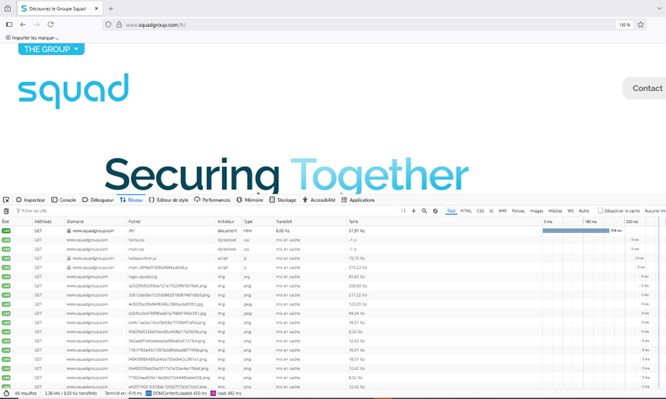
Caching web pages via Firefox
Hidden, yes, but this process has a clearly defined lifespan. Keeping the same resource on disk storage indefinitely can cause malfunctions on the website. For example, if the resource has been updated by the site manager. Each resource on disk therefore has an expiration date.
Where is he hiding?
Depending on your browser, cached resources can be viewed directly by entering: "about:cache" in Firefox or from your hard drive.
C : \Users\John\AppData\Local\Mozilla\Firefox\Profiles\{profile folder}\cache2.
These files do not have extensions.
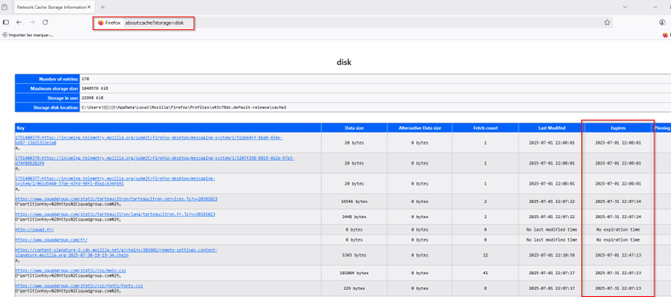
Firefox browser cache files with expiration date
How does the browser determine which file types it can cache?
Through the content type field of the HTTP request.
Who defines the content type?
The remote web server
On your keyboards, get set, hack!
All you need to do is create a fake website and place malicious code in its resources. In the example shown, this will be a reverse shell in the form of a DLL (Dynamic Link Library) built using Metasploit on Kali Linux. All that remains is to give it an "image" type in the web server configuration so that it is loaded on the victim's browser when they visit the compromised site. The cache file will contain the contents of calc.dll.
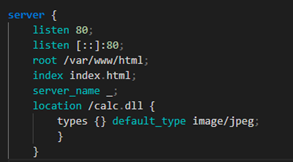
Setting the image type on the web server
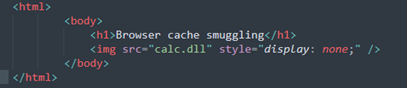
HTML page of the malicious website with the DLL
But wait! Is it possible to execute a DLL from a cache file?
Microsoft has implemented a measure to prevent the launch of arbitrary code without an extension, which poses a problem. However, by adding a "." at the end of the cache file, execution via rundll32 is possible.
Delivery successful, but...
An executable file can therefore be launched, but the next challenge is to find a way to execute this file silently and, above all, to identify a way to dynamically distinguish it from other files in the cache.
Why? Because on disk, the cache file has a name made up of random numbers and letters, so you have to find the file you want in order to run it.
For this last point, a simple technique will solve the problem: inserting a flag (a predefined character string).
For Firefox, we can configure this indicator in the HTTP header of the response at the web server level.
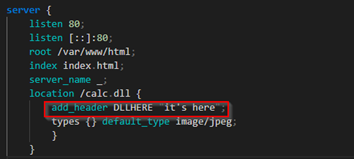
Adding the header for Firefox
For Chrome, it is slightly more complex due to storage in an SQLite database. However, we can generate a specific character string at the beginning and end of the calc.dll file. This will allow us to create a regex with these two parameters to identify the target file for execution.
One execution short
To avoid triggering alerts at the EDR level and remain undetected by the SOC, this DLL must be executed by a parent process originating from a legitimate program used within the company. It must also communicate with the Internet so that a reverse shell is possible and encapsulated in the HTTP/HTTPS protocol.
You might as well use a service that is constantly connected to the Internet and installed on almost all professional workstations: Microsoft Teams.
A well-known attack on older versions of Teams and OneDrive involves exploiting the folder where the application is installed. This folder is called "localappdata," a space where users who are not administrators can read files AND write to them.
This makes it the perfect target.
It is also important to note that Microsoft Teams requires certain DLLs to function properly. Calls may also fail because the files may be distributed across multiple locations on the Windows system.
The Windows system follows a specific order when searching for a DLL:
- The application file itself
- C:\Windows\System32
- C:\Windows\System
- C:\Windows
- The folder where the application binary was executed
- The folders listed in the PATH environment variable
Using the "Process Explorer" tool from the Sysinternals suite, we can identify calls from the Teams process and search for certain DLLs. Those that are not found directly in the application folder itself will be searched for according to the Microsoft operating system's search order.
First load, first execute
The goal is therefore to modify and replace our malicious DLL with an existing one that is necessary for Team to function and that is not already in the application folder. We must also reference the real DLL at the end of our program. Why? Teams needs certain functions present in the legitimate DLL to launch; without them, the program will close with an error.
But who will make this copy?
The answer: the user.
The goal is to plan a social engineering campaign, target a victim so that they visit the attacker's website and cache the malicious DLL file. Then, impersonate user support and pretend to be browsing a questionable government website (Russia, China, etc.). Send them a Powershell command to run from their workstation. The purpose of this command is to copy the cache file containing the flag to the Teams application folder. This command will also rename the file to a real dll name found in system32 and used by Teams, e.g., VERSION.dll.
The next time Teams is launched, the DLL will be executed, the reverse shell will be operational, and the latter will also call on the legitimate "VERSION.dll."
This technique is called DLL Proxying.
Here is a summary of the attack:
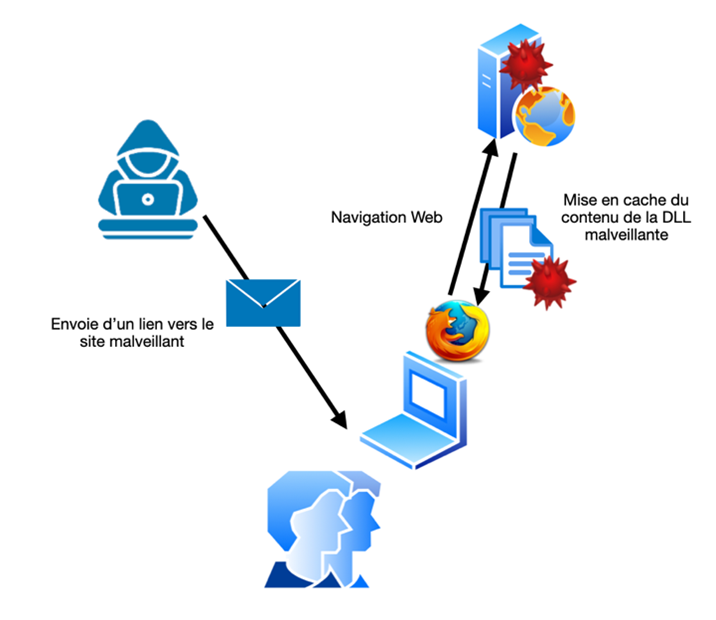
Step 1: Caching the payload
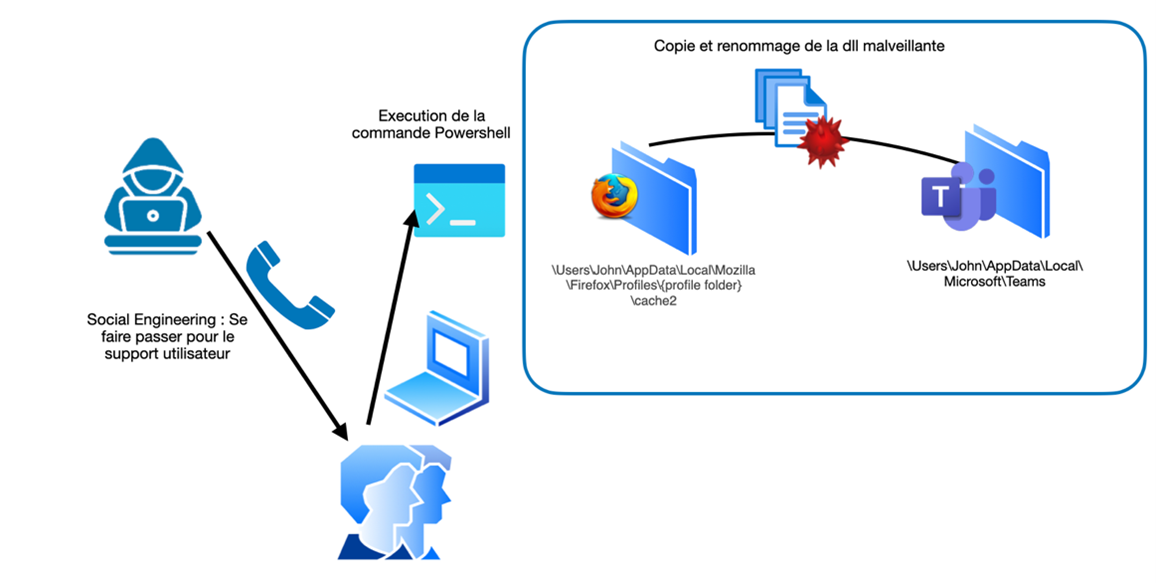
Step 2: Social engineering to execute the payload
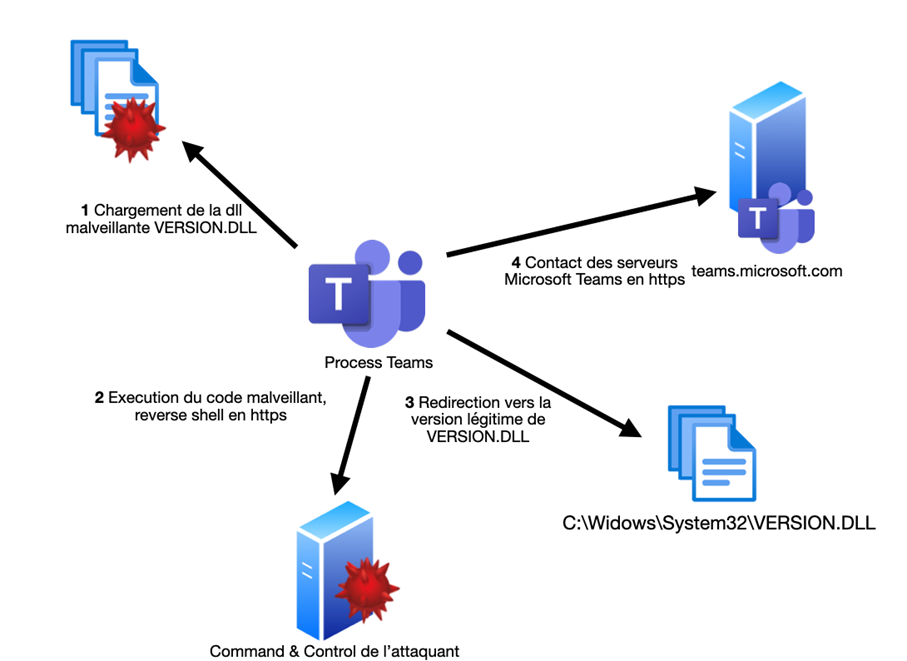
Step 3: Execution of the payload by Microsoft Teams
How can you protect yourself?
Strengthen user positions:
- Disable scripting engines for people who don't need them
- Install the programs in C:\Programs
- Create a registry key to clear the cache at the end of each session
• Perform detection
- Trigger an alert if it is not a browser process that is manipulating the cached files
- Monitor activity located in localappdata
Conclusion: not necessarily a perfect attack
There are numerous limitations to this attack:
- The cache has a maximum lifespan, so the attack must be exploited before it expires.
- An attack based on spear phishing and social engineering requiring action from the victim.
- Exploitation of a known vulnerability in older versions of Teams/OneDrive that has now been patched
- Some EDRs detect DLL proxying and the action of launching PowerShell by a user in order to copy a file to the appdata folder.
- Highly sensitive attack depending on the type of browser used (particularly for retrieving our payload)
- The user station can be proxified and a reverse shell to an uncategorized IP or domain can be blocked.
A good attacker is one who remains hidden.
The content of this article is based on research by Aurélien Chalot (aurelien.chalot@protonmail.com).
Vicent L.
Security Engineer