For once, instead of discussing topics such as the cloud, DevOps, conference feedback, and cybersecurity, as I often do, I'm going to focus on data. No, I'm not going to discuss the concept of data lakes, but rather the software and tools aspect of the subject.
At a client's site, I had the opportunity to discover a technology related to the field of data, namely Apache NIFI. It turns out that it is a data flow management tool that enables ingestion, processing, and transfer between multiple systems using a very streamlined graphical interface.
It should be noted that this project was not initiated by the Apache Foundation (which created Zookeeper, which I discussed several years ago, and Kafka) but by the NSA in 2006, which finally released the project in 2014 as part of its technology transfer program, entrusting it to the Apache Foundation.
The NIFI principle
Apache NIFI is a data management automation solution, basically a pass-through.
Depending on the processors you define on the interface, it will retrieve the data (a file, an API request, the contents of an S3 bucket, CSV, JSON, etc.) and send it to its final destination (RabbitMQ, Kafka, JMS, PubSub, AMQP, etc.).
There are quite a few Processors available, allowing you to address many different use cases in order to store and process data locally or on the most popular cloud platforms.
Templates are available all over the internet, including on an Apache Foundation Confluence page and on Cloudera's Community page.
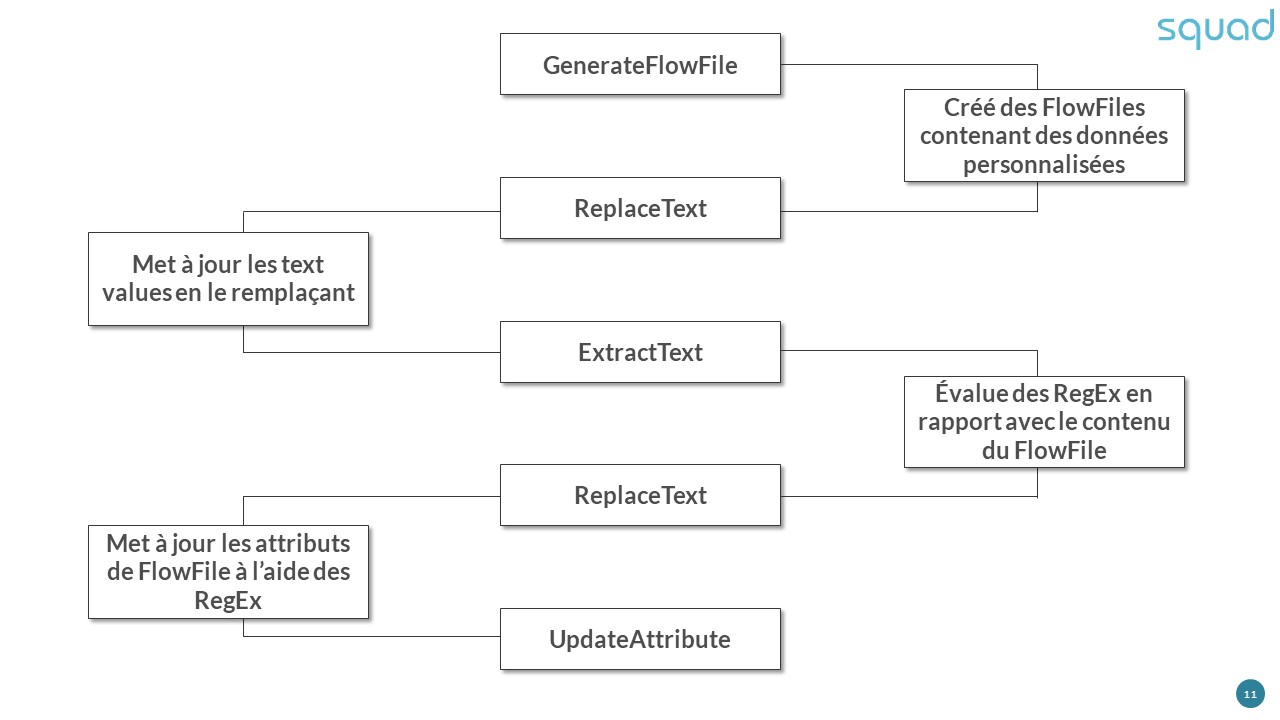
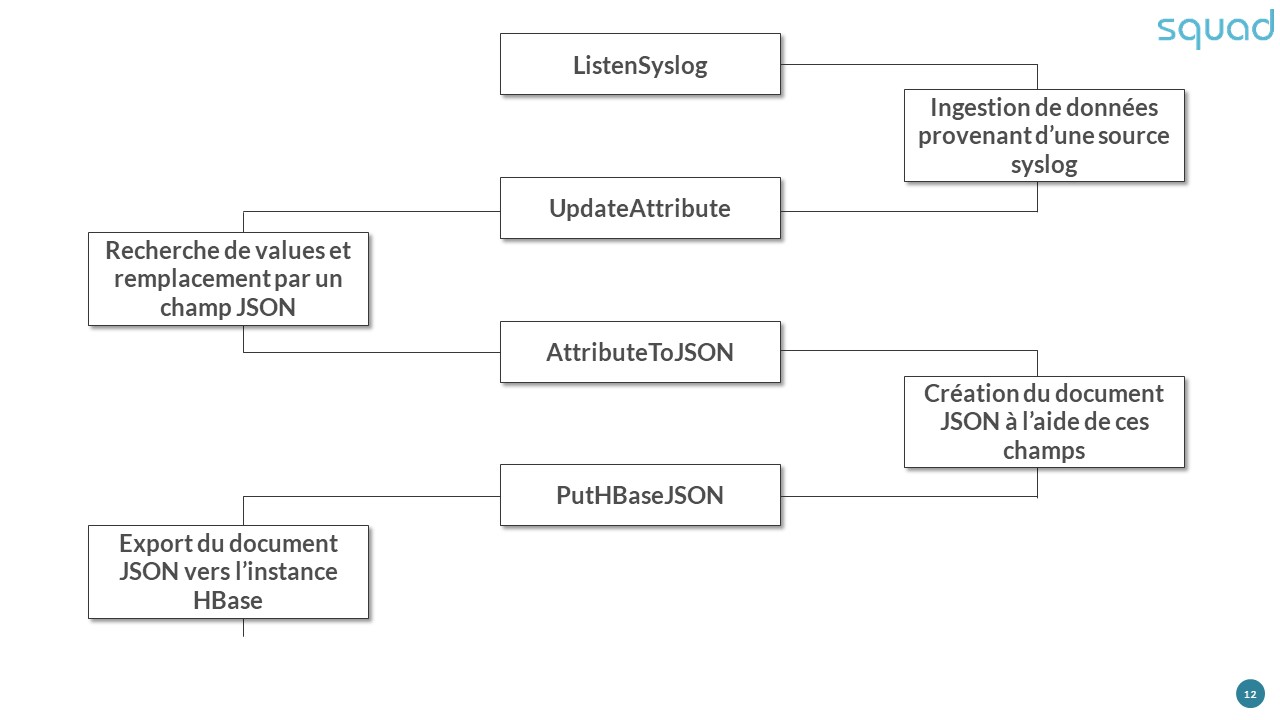
Numerous applications, or Flows, are possible from among the following:
Converting a CSV entry into a JSON document:
Ingestion of log files via syslogs for storage in HBase:
Call to an HTTP web service:
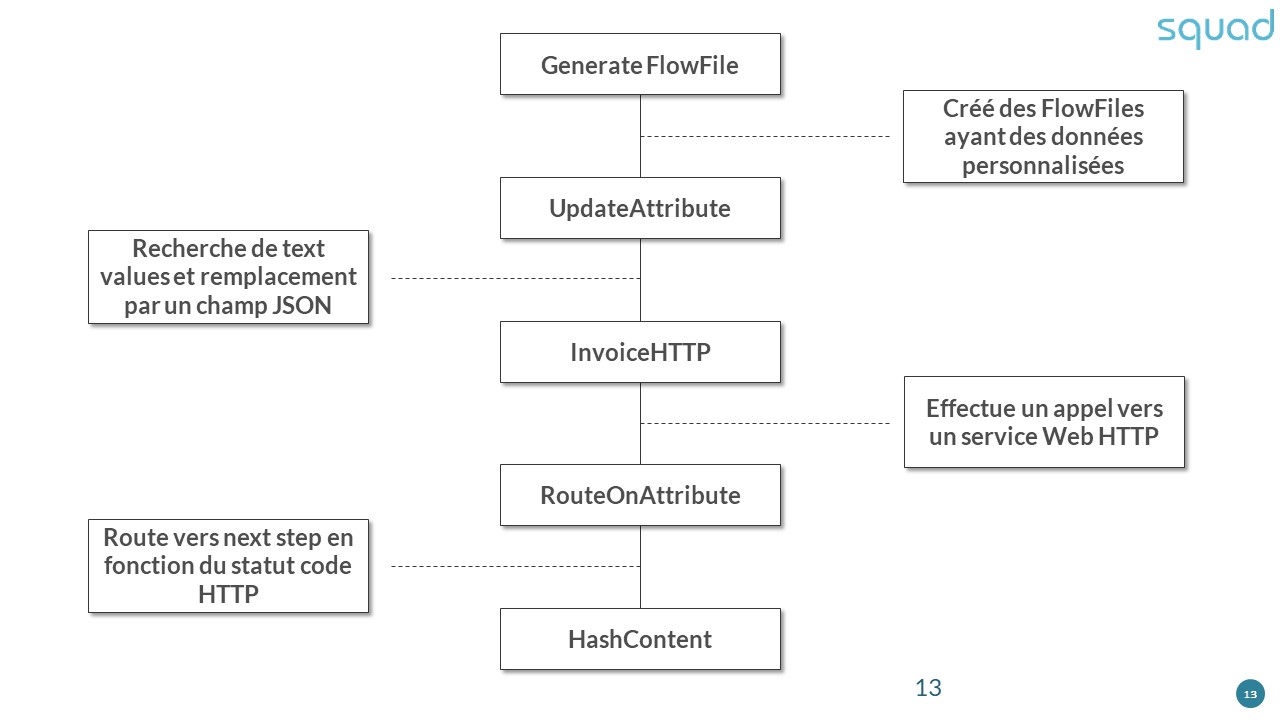
The examples shown above are not exhaustive; they can also be edited and imported into your Apache NIFI instance.
How to deploy it?
- Several deployment methods are available:
Standalone AiO: The default configuration of NIFI includes an internal Zookeeper instance. - Standalone Cluster : Two configuration options allow you to decentralize cluster management using an external Zookeeper instance.
- Standalone multi-instance AiO : similar to the Standalone AiO configuration, load balancing can be performed within a Zookeeper cluster directly integrated into Apache NIFI.
- Standalone Multi-Instance Cluster : Same as the previous configuration... using multiple external Zookeeper instances.
But that's not all: the Apache Foundation (or at least the developers) have also thought about container fans, as it is also possible to deploy the application using docker-compose and Kubernetes (via the Helm package manager and the Operator available here).
Points to note
- Apache NIFI is extremely resource-intensive and requires a lot of disk space; allow at least 1 GB for the archive. The service starts up without any problems on a low-spec server, but startup will be very time-consuming. For example, on a virtual machine with 1 vCPU and 1 GB of RAM, NIFI takes several minutes to start up.
- As with many projects supported by the Apache Foundation, there are a few prerequisites. The first and most important is Java, or OpenJDK (version 11 works very well).
- The configuration is clearly explained on the official website, with each option detailed, whether it be clustering (Zookeeper), encryption (I will discuss this later), notifications, proxyconfiguration, etc. Everythingis there and easy to access. If you can't find what you're looking for, a simple Internet search will provide you with the answer you need.
- The Apache Foundation has also made available a NIFI Toolkit for a variety of uses: Flow Analyzer, Node Manager, Cli (to facilitate the launch of NIFI), Zookeeper Migrator, etc.
Security and Encryption
When I refer to security and encryption, I am referring to TLS certificates, user management, and KMS-type key stores, which brings us to the nifi.security section of the nifi.properties file.
TLS certificates
In Apache, Nginx, Cherokee, and other relatively simple configuration services, declaring TLS certificates does not require the use of black magic or other exotic tools/software... however, some services that require Java to function need a Keystore.
Creating such an artifact sometimes requires acrobatics using the following commands:
# Creating the keystore
keytool-genkey-alias mydomain -keyalg RSA -keystore KeyStore.jks -keysize 2048
# Generate a basic CSR in the new keystore
keytool-certreq-alias mydomain -keystore KeyStore.jks -file mydomain.csr
# Import root and intermediate certificates into your keystore
keytool-import-trustcacerts-alias root -file root.crt -keystore KeyStore.jks
keytool-import-trustcacerts-alias intermediate -file intermediate.crt -keystore KeyStore.jks
# Download and import your new certificate
keytool-import-trustcacerts-alias mydomain -file mydomain.crt -keystore KeyStore.jks
For its part, NIFI offers a much simpler method using the NIFI Toolkit: tls-toolkit.sh, a single command, instead of five, to generate a keystore in a much more reliable way.
bin/tls-toolkit.sh standalone -n'nifi[01-10].subdomain[1-4].domain(2)'-C'CN=username,OU=NIFI'--subjectAlternativeNames'nifi[21-30].other[2-5].example.com(2)'
I invite you to browse the documentation on the different scenarios involving tls-toolkit (Standalone or Client/Server).
KMS key stores
This is a vast subject, between the NIFI Toolkit offering the command encrypt-config.sh and password encryption configuration options using Hashicorp Vault, AWS KMS, Google Cloud KMS, and Azure Key Vault, nothing is missing when it comes to securing your NIFI instance as best as possible (and I haven't addressed OS hardening in the case of a virtual machine, which will not be covered in this article).
Regarding security key management/generation services, each has its own section in the nifi.properties configuration file:
- Hashicorp Vault: vault,
- AWS KMS: aws.kms,
- Azure Key Vault: azure.keyvault,
- Google Cloud KMS: google.kms
I have only touched on the sections here, but of course the configuration options are much more comprehensive, including the service URL, the credentials for NIFI to authenticate, the key path or ID, and, in the case of Hashicorp Vault, the types of stores (SSL keystore/truststore, key/value), the enabled encryption suites, the different protocols, etc.Extremely comprehensive configuration options.
The command encrypt-config.sh command in the NIFI Toolkit takes the concept of security relatively far by encrypting the encryption configuration directly in the nifi.properties file.
Who thought: Two security measures are better than one?
User management
At this level, there are quite a few options available: Single User, Lightweight Directory Access Protocol, Kerberos, OpenID Connect, SAML, Apache Knox, and JSON Web Tokens, with Single User as the default.
The default credentials are in the login-identity-providers.xmlfile ...unencrypted, but you can change them with the following command:
./bin/nifi.sh set-single-user-credentials <username><password>
Configuring Lightweight Directory Access Protocol (or LDAP) requires a little more effort, especially in the login-identity-providers.xml file, after modifying the nifi.security.user.login.identity.provider option.
The special LDAP login-identity-providers.xml file
<provider>
<identifier>ldap-provider</identifier>
<class>org.apache.nifi.ldap.LdapProvider</class>
<property name="Authentication Strategy">START_TLS</property>
<property name="Manager DN"></property>
<property name="Manager Password"></property>
<property name="TLS - Keystore"></property>
<property name="TLS - Keystore Password"></property>
<property name="TLS - Keystore Type"></property>
<property name="TLS - Truststore"></property>
<property name="TLS - Truststore Password"></property>
<property name="TLS - Truststore Type"></property>
<property name="TLS - Client Auth"></property>
<property name="TLS - Protocol"></property>
<property name="TLS - Shutdown Gracefully"></property>
<property name="Referral Strategy">FOLLOW</property>
<property name="Connect Timeout">10 secs</property>
<property name="Read Timeout">10 secs</property>
<property name="Url"></property>
<property name="User Search Base"></property>
<property name="User Search Filter"></property>
<property name="Identity Strategy">USE_DN</property>
<property name="Authentication Expiration">12 hours</property>
</provider>
The official documentation is very comprehensive, and I strongly encourage you to take a look at it to learn about all the available configuration options and thus secure your NIFI instance as best as possible.
There is a lack of truly free and open-source alternatives. Among cloud providers, there is no service that integrates all of NIFI's features, but rather a combination of several:
- AWS: Data Pipeline, Glue, and SWS (Simple Workflow Service),
- Azure: Data Factory, Data Catalog, and Logic Apps,
- Google Cloud: DataPrep and Cloud Composer,
- IBM Cloud: DataStage and Watson Knowledge Catalog,
Furthermore, despite the apparent simplicity of the interface and the relative ease of setting up data flow management workflows, the very high number of Processors and Controllers, some of which are in the process of being deprecated, still documented but with no announced end date, can really become an obstacle to using this solution.
And I'm not even mentioning the multiple versions of the same Processor ( those related to Kafka, for example)...just in case it might be useful.
Mickaël DANGLETERRE
Cloud & DevOps Architect